Call or WhatsApp us anytime
Mail Us For Support

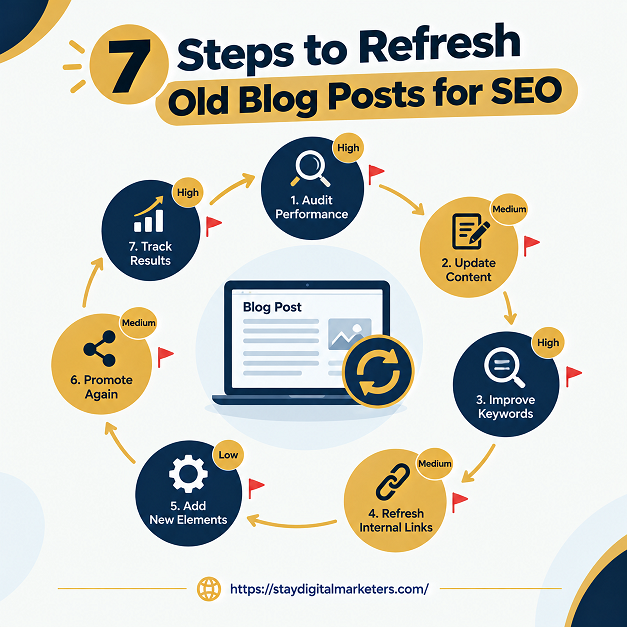
Refreshing an old blog post means changing its facts, structure, and answers so it matches what searchers want now, then republishing it at the same URL. It is different from changing the date, which alters nothing a reader or a search engine can use.
The process involves several entities: Google Search Console, search intent, internal links, structured data, content decay, and AI Overviews. Google says its systems use several factors to estimate when a page was “published or significantly updated,” so the work has to be visible in the content itself.
Key Takeaways
I reviewed all four pages in the brief. Three are published by companies that sell the tools they recommend.
The shared gap is attribution. Every guide tells you what to change, but none shows how to tell whether the refresh caused the result, as opposed to seasonality or an algorithm update. This guide fills that gap with a ledger and a control group.
The Refresh Ledger Method is an eight-step process that records every change and compares refreshed posts with similar posts left alone. The record and the comparison are what let you trust the result.
Export your blog URLs with clicks, impressions, and average position from Search Console. Surfer suggests sorting each post into Keep, Update, Overhaul, or Remove, and flagging pages that rank in positions 11 to 20. That gives you a short list instead of a whole archive.
Pick one main cause per post, because stacking several fixes at once makes the result impossible to read. The DevOps Web Designers guide offers a useful triage that I have adapted:
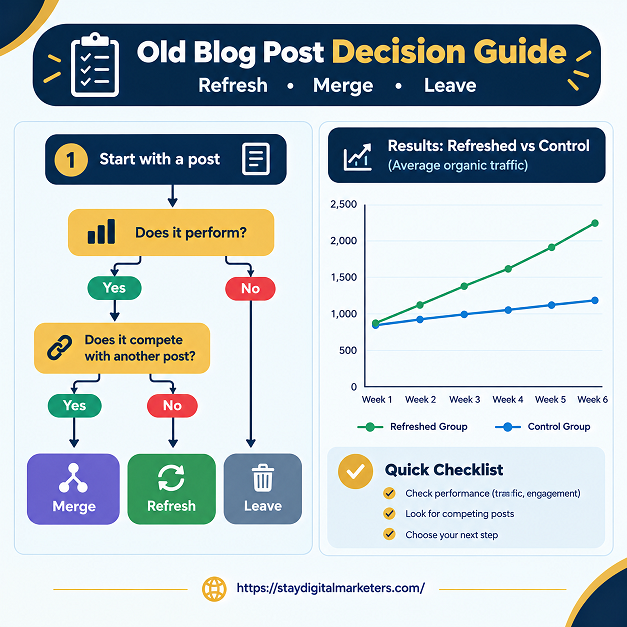
Not every old post deserves work. Merge posts that compete for one query into the strongest URL and redirect the rest. Leave posts alone if they still perform, since an edit can only make them worse. Redirect a merged post with a 301 so its links and visitors reach the surviving page. Observed across client work, teams often spend a full day updating a post that had no business value, while a high-potential post slipped further.
Ahrefs warns against date-only updates, but gives no threshold. A workable rule: change the facts, rewrite the opening answer, and add or replace at least one section. If a reader cannot see what changed, neither can Google.
Revise the title, meta description, headings, internal links, and structured data. Google advises making dates consistent, so the visible date and structured date should match, and labels such as “Last updated” help readers. Keep the URL unless you overhaul the topic.
Add something a competing page lacks: your own data, a tested example, an expert quote, or a clearer framework. In practice, this step separates a refresh that moves rankings from one that only fixes typos.
Create a ledger with one row per post: URL, refresh date, cause, what changed, and baseline clicks and impressions for the prior 28 days. DevOps Web Designers also recommends recording each change with its date. Without it, you cannot explain a gain or a loss later, and you will repeat changes that did nothing. Keep the ledger in a shared spreadsheet so anyone on the team can read it.
Pick several similar posts you did not refresh and track them alongside. If both groups rise or fall together, seasonality or an update is the likely cause. If only the refreshed group moves, the refresh is the likelier cause. This is a practitioner method, not a proven standard, but it fixes the weakness Ahrefs itself admits.
The table shows what each step does and the mistake it prevents.
| Step | Main action | Source basis | Mistake prevented |
| 1. Sort | Export and triage | Surfer, DevOps guide | Refreshing at random |
| 2. Diagnose | Find one cause | DevOps guide, adapted | Fixing the wrong thing |
| 3. Decide | Refresh, merge, or skip | Practitioner method | Wasted effort |
| 4. Substance | Change facts and answers | Ahrefs warning | Date-only edits |
| 5. On-page | Titles, links, dates | Google date guidance | Mismatched dates |
| 6. Info gain | Add original value | Ahrefs | Typo-level refresh |
| 7. Log | Record each change | DevOps guide | No audit trail |
| 8. Control | Compare to unrefreshed posts | Practitioner method | False credit |
Sometimes. Ahrefs reports that a link reclamation post published in 2018 drew about 350 monthly organic visits before an August 2024 rewrite, and that its traffic roughly tripled afterward. That is a single post on a single site, and Ahrefs notes that algorithm updates and other factors can explain changes.
Treat it as a case worth testing, not a rule. It also shows why step 8 exists: without a control group, no one can say how much of the gain came from the rewrite.
Ahrefs analyzed 17 million AI citations and reported that AI-cited URLs were 25.7% fresher than URLs in organic results. It also reported that the average time since last update was 909 days for AI-cited URLs versus 1,047 for organic results.
This is vendor research and shows association, not cause. It supports keeping facts current, but not the idea that a refresh guarantees a citation. Use it to prioritize posts that cover fast-changing facts.
There is no proven schedule. Surfer’s guide suggests every 6 to 12 months but cites only its author’s own tool, and the DevOps Web Designers guide suggests quarterly reviews without evidence. Review posts on a regular calendar, then refresh only those whose clicks, intent match, or facts have slipped.
No reliable evidence says so. Google states that its systems estimate when a page was published or significantly updated using several factors, not one date. Ahrefs also warns against date-only changes. Make real changes to facts, sections, and answers, then show a visible date that matches your structured data.
Start with posts that once performed and have slipped. The Surfer and SEOptimer guides both point to pages ranking in positions 11 to 20 in Search Console, and to pages with high impressions but low clicks. Skip posts that were recently overhauled and posts with no business value.
Usually not. SEOptimer’s guide advises keeping the URL and changing it only for a major overhaul or restructure, with a 301 redirect from the old address. A needless URL change adds redirect work and risks losing signals. Keep the address if the topic is unchanged.
Possibly. Ahrefs analyzed 17 million AI citations and reported that AI-cited URLs were 25.7% fresher than URLs in organic results. That is vendor research and shows association, not cause. Update facts and add clear answers, but do not expect a guaranteed citation.
No source reviewed gives a reliable timeline. The DevOps Web Designers guide says only to wait until enough time has passed. Record a baseline before editing, compare against similar posts you did not refresh, and review after a full reporting window instead of after a few days.
A refreshed post is stronger when other sites reference it, because updated facts give editors a reason to cite you. Stay Digital Marketers assists brands with backlink-related services, including guest posting, press release distribution, SaaS backlinks, niche edits, multilingual backlinks, Wikipedia page creation, Google Knowledge Panel creation, and complete SEO services.

Filza Taj is an MPhil in Human Resources-turned SEO Specialist, Content Strategist, and Digital Marketing Consultant with over 5 years of experience helping businesses in 30+ countries grow online. As the Founder of Stay Digital Marketers (staydigitalmarketers.com), she delivers results-driven solutions in link building, guest posting, PR distribution, niche edits, multilingual backlinks, and content marketing. She publishes daily SEO insights and actionable strategies to help brands strengthen their online presence, attract the right audience, and convert clicks into loyal customers.
Filza@staydigitalmarketers.com
Stay Digital Marketers
Need SEO, Link Building or Digital Marketing Services?
Request a Free Audit →