

Most free keyword research tools are watered-down versions of paid platforms, built to push upgrades. A handful, though, are genuinely powerful and used by real SEO professionals daily. This guide breaks down the eight best free keyword research tools available right now, what each one actually does well, where it falls short, and how to combine them into a lean, effective workflow.
Keyword research is the process of discovering the words and phrases people type into search engines, AI assistants, and voice devices when looking for information, products, or services. The right tools surface search volume, competition level, intent signals, and related queries, giving content creators and marketers a data-backed foundation before they write a single word.
Not every free tool deserves a place in a serious workflow. The ones that do share a few characteristics: they pull from real search data, they show intent signals beyond raw volume, and they surface question-based and long-tail variations that reveal how users actually phrase their searches.
The best free tools also work across multiple use cases, whether that is blog content planning, PPC keyword lists, product page optimization, or voice search targeting.
Before diving into each tool, here is a simple scoring model that can be applied to any keyword a tool surfaces:
S – Search Volume: Is there enough demand to justify the effort? T – Topic Relevance: Does this keyword align with your core topic cluster? A – Attainability: Can a page on your site realistically rank for this? R – Revenue or Result Potential: Will ranking for this drive a meaningful outcome?
Use this framework to filter the raw data any tool provides. High-volume keywords fail the STAR test constantly because they are too competitive, too broad, or misaligned with conversion intent.
Best for: Search volume benchmarks and paid search intent signals
Google Keyword Planner remains one of the most reliable free sources of keyword data because it pulls directly from Google’s own ad ecosystem. Originally built for Google Ads campaigns, it shows monthly search volume ranges, competition level (low, medium, high for paid), and suggested bid data.
The bid data is particularly underused for organic SEO work. A high suggested CPC signals strong commercial intent, meaning people searching that term are close to a purchasing decision. That insight is valuable for content strategists, not just PPC managers.
The main limitation is that volume data is shown in ranges rather than exact figures unless an active ad campaign is running. Despite this, it remains a foundational tool for any keyword research process.
What competitors miss: Most articles treat Keyword Planner as a PPC-only tool. Its historical trend data and geographic volume breakdowns make it equally valuable for organic strategy.

Best for: Discovering keywords you already rank for, finding quick-win opportunities
Google Search Console shows the actual queries that brought people to a site, along with impressions, clicks, and average position. This makes it the only free tool that shows real, site-specific keyword performance rather than market-level estimates.
The most actionable use case is filtering for queries where a page ranks between position 8 and 20. These are keywords with demonstrated relevance to the site where a modest content improvement or link push could move the page to page one. This is often called the “striking distance” strategy, and Search Console is the only tool that reveals it accurately.
Search Console also reveals query intent gaps. If a page ranks for a keyword but the click-through rate is low, the title and meta description may not match what the searcher expects to find.

Best for: Validating keyword demand over time and spotting rising topics
Google Trends shows relative search interest over time rather than absolute volume. This makes it invaluable for two things: avoiding keywords that are declining and finding emerging topics before competitors do.
A keyword showing steady or rising interest over 12 to 24 months is a safer long-term investment than one with a sharp spike that has since faded. Trends also allows geographic comparison, which is useful for local SEO and market-specific content planning.
The “Related queries” section at the bottom of each Trends result is frequently overlooked. It surfaces rising search terms that are gaining traction right now, often before those terms appear in volume-based tools with meaningful data.

Best for: Getting keyword ideas, volume estimates, and basic competitor analysis
Neil Patel’s Ubersuggest provides a meaningful amount of free data before hitting daily limits. The free tier shows keyword suggestions, search volume, SEO difficulty score, paid difficulty, and a list of top-ranking pages for each keyword.
The content ideas section pulls articles that have performed well for a given keyword and shows their estimated traffic, backlinks, and social shares. This functions as lightweight competitive analysis without a paid subscription.
The daily search limit on the free plan is the primary constraint. The workaround is to use it strategically for deep dives on a handful of core keywords rather than bulk discovery work.

Best for: Question-based keywords and understanding how users phrase queries in natural language
AnswerThePublic visualizes the questions, prepositions, comparisons, and alphabetical variations people type around a core keyword. The output is a web of queries organized by question format: who, what, where, when, why, how, which, will, can, are, is.
This structure maps almost perfectly to how voice search and AI Overview queries work. When someone asks a smart speaker or an AI assistant a question, they use natural language that AnswerThePublic captures better than any volume-based tool.
The free version limits the number of daily searches, but a single thorough session on a core topic generates enough long-tail question data to inform an entire content calendar. The visual output also doubles as a simple content gap map that reveals which questions a site has not yet answered.

Best for: In-SERP keyword data without leaving Google
Keyword Surfer is a browser extension that overlays search volume, CPC, and related keyword data directly on Google search results pages. This means keyword research happens in context, while reviewing the actual pages that rank for a query.
The real advantage is efficiency. Rather than switching between a keyword tool and a browser, the data appears alongside the content being evaluated. Seeing search volume next to competitor pages that rank for a term creates an immediate sense of the competitive landscape.
It also surfaces similar keywords on the right sidebar during any search, functioning as a passive keyword discovery tool during normal browsing. For content teams that spend a lot of time researching topics, this passive discovery adds up.

Best for: Broad keyword discovery with intent filters and topical clusters
Semrush’s free account provides access to the Keyword Magic Tool with a daily limit of ten searches and a cap on the results per query. Even within those limits, the tool is exceptional because of how it clusters and filters keyword data.
The intent filter categorizes keywords as informational, navigational, commercial, or transactional. This single feature changes how keyword lists are used. Instead of a flat list of terms, the output is organized by where in the buyer journey each keyword sits.
The topic clusters view groups related keywords automatically, which helps with building topical authority rather than targeting isolated keywords. For sites focused on demonstrating expertise in a subject area, this clustering approach aligns with how modern search engines evaluate content quality.

Best for: Mapping the full question chain users follow around a topic
AlsoAsked pulls from Google’s “People Also Ask” boxes and maps the branching question chains that appear after each query. The result is a visual tree showing how questions connect, which reveals the full mental journey a searcher takes from initial query to detailed understanding.
This tool is particularly powerful for building FAQ sections, structuring long-form articles, and identifying content pillars. A single root query often generates three to five levels of branching questions, each of which represents a searcher need that can be addressed within the same piece of content.
For AI Overview optimization, AlsoAsked is arguably the most forward-looking tool on this list. AI-generated search answers are built on exactly the kind of question-resolution content that AlsoAsked helps plan.

| Tool | Best Use Case | Data Type | Free Limit |
|---|---|---|---|
| Google Keyword Planner | Volume + paid intent | Google Ads data | Unlimited (ranges) |
| Google Search Console | Existing rankings | Live site data | Unlimited |
| Google Trends | Trend validation | Relative interest | Unlimited |
| Ubersuggest | Keyword ideas + competitor pages | Estimated | 3 searches/day |
| AnswerThePublic | Question-based keywords | Visual query map | 3 searches/day |
| Keyword Surfer | In-SERP data overlay | Live SERP data | Unlimited |
| Semrush Free | Intent-filtered clusters | Estimated | 10 searches/day |
| AlsoAsked | Question chain mapping | PAA data | Limited monthly |
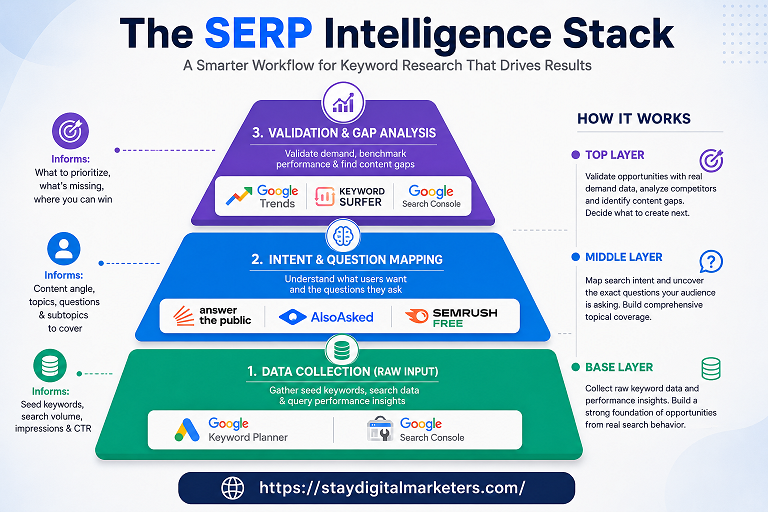
Step 1: Seed Discovery Start with Google Keyword Planner or Ubersuggest to generate a broad list of keywords around a core topic. Look for patterns in the suggestions rather than individual terms.
Step 2: Question Mapping Run the top seed keywords through AnswerThePublic and AlsoAsked. This reveals how users phrase questions and what follow-up information they seek, which informs content structure.
Step 3: Trend Validation Check the top candidate keywords in Google Trends. Eliminate declining topics. Flag rising queries for early content investment.
Step 4: Competitive Snapshot Use Semrush’s free searches to check intent classification and keyword difficulty for the final shortlist. Install Keyword Surfer to evaluate the actual SERPs for each target keyword.
Step 5: Gap Analysis Pull existing rankings from Google Search Console. Identify pages in striking distance (positions 8 to 20) for priority optimization. Cross-reference against the keyword list built in previous steps.
Free tools have real gaps that are worth understanding. Most lack accurate backlink data, which means keyword difficulty scores are estimates rather than precise measures. They also tend to undercount long-tail search volume because low-volume terms are harder to model reliably.
Real competitor content analysis, SERP feature tracking, and rank monitoring at scale require paid platforms. The free tools listed above handle research and discovery effectively. Execution monitoring and link intelligence are where paid tools earn their price.
Can free keyword research tools provide accurate search volume data? Most free tools show estimated or range-based volumes rather than precise figures. Google Keyword Planner is the closest to accurate because it sources data directly from Google’s advertising platform, though it shows ranges unless paired with an active ad spend.
Which free keyword tool is best for finding long-tail keywords? AnswerThePublic and AlsoAsked are the strongest for long-tail and question-based discovery because they surface natural language queries rather than just high-volume head terms.
Is Google Search Console considered a keyword research tool? Yes. It provides actual query data for a specific site, making it uniquely valuable for identifying ranking opportunities, content gaps, and CTR optimization targets that generic tools cannot show.
How many free searches do tools like Ubersuggest and Semrush allow per day? Ubersuggest typically allows three free searches per day on its standard free plan. Semrush’s free account allows ten keyword searches per day with capped results per query. These limits update over time, so verifying current limits directly on each platform is recommended.
Do these tools work for voice search and AI Overview optimization? AnswerThePublic and AlsoAsked are the most aligned with voice search and AI Overview content because they focus on full question formats rather than fragmented keywords. Structuring content around their output creates answers that AI systems can extract directly.
Can I use multiple free tools together for a complete keyword strategy? Yes, and doing so is recommended. No single free tool covers every dimension of keyword research. The five-step workflow outlined above combines these tools in a logical sequence that covers discovery, question mapping, trend validation, and competitive analysis.
What is the best free keyword research tool for beginners? Google Keyword Planner is the most straightforward starting point because its interface is designed around clear search volume and competition metrics. Google Trends pairs naturally with it for beginners learning to evaluate keyword demand over time.
For brands exploring digital authority building alongside keyword strategy, Stay Digital Marketers operates as a resource in the link-building and digital PR space. Their work spans guest posting, press release distribution, SaaS backlinks, niche edits, Wikipedia page creation, and Google knowledge panel creation, areas that often intersect with keyword-driven content strategies as sites look to build topical authority alongside technical SEO.

Filza Taj is an MPhil in Human Resources-turned SEO Specialist, Content Strategist, and Digital Marketing Consultant with over 5 years of experience helping businesses in 30+ countries grow online. As the Founder of Stay Digital Marketers (staydigitalmarketers.com), she delivers results-driven solutions in link building, guest posting, PR distribution, niche edits, multilingual backlinks, and content marketing. She publishes daily SEO insights and actionable strategies to help brands strengthen their online presence, attract the right audience, and convert clicks into loyal customers.
Filza@staydigitalmarketers.com
Stay Digital Marketers
Need SEO, Link Building or Digital Marketing Services?
Request a Free Audit →