
Link velocity is the rate at which a site gains backlinks over a set period, usually measured as new links divided by days. Google has never confirmed it as a ranking signal, but tracking it still helps you catch spikes, losses, and stalled campaigns early.
Link velocity belongs to the wider practice of backlink monitoring. The tools below read data from link indexes such as Ahrefs, Semrush, Majestic, and Google Search Console, then show how many links or referring domains a site gained or lost per week or month. Growth rate is the same idea expressed as a percentage change against the previous period.
Two formulas cover most needs. Link velocity equals new backlinks divided by the number of days. Net velocity equals new links minus lost links over the same window. Net velocity is the more honest number, because a site that adds 40 links while losing 35 is barely growing.
Key Takeaways
No confirmed evidence says it does. Google’s John Mueller has said the rate of link growth is not the issue, only whether the links look natural. Gary Illyes has called “link velocity” a made-up term. Search Engine Journal reviewed the claim and found no evidence that Google uses it as a ranking signal.
The idea has a root. A 2003 Google patent mentions a “spiky rate of growth” in links, but it never uses the word velocity, and a patent describes what a company may do, not what it does in production.
So treat velocity as a diagnostic, not a target. You track it to catch a burst of spammy links, a quiet loss of good ones, or a campaign that stopped delivering. You do not track it to hit a magic monthly number.
Three gaps show up across the pages that rank for this topic. First, several repeat the claim that velocity is a ranking factor without citing a Google source, which conflicts with the public statements above. Second, many tool comparisons are published by vendors that sell one of the tools on the list, so the recommendations lean toward their own product.
Third, almost none explain how to judge a number once you have it. A figure like “28 new referring domains last month” means nothing without a baseline and a competitor comparison. The framework below fills that gap, and the tool list that follows is organised around it.
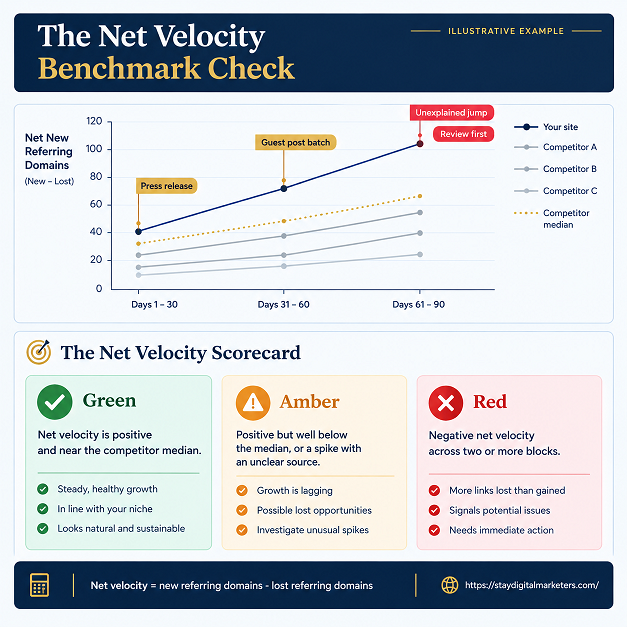
The Net Velocity Benchmark Check compares your net referring-domain growth against your own 90-day baseline and against three competitors, then ties every spike to a known cause. It takes about an hour per site and works with any tool in this guide.
Score the result simply. Green means net velocity is positive and near the competitor median. Amber means it is positive but well below the median, or a spike has an unclear source. Red means net velocity is negative across two or more blocks.
Reviewing backlink profiles across client work shows that the most common problem is not a spike. It is a flat line caused by lost links that nobody noticed, which is why the net figure matters more than the headline count.
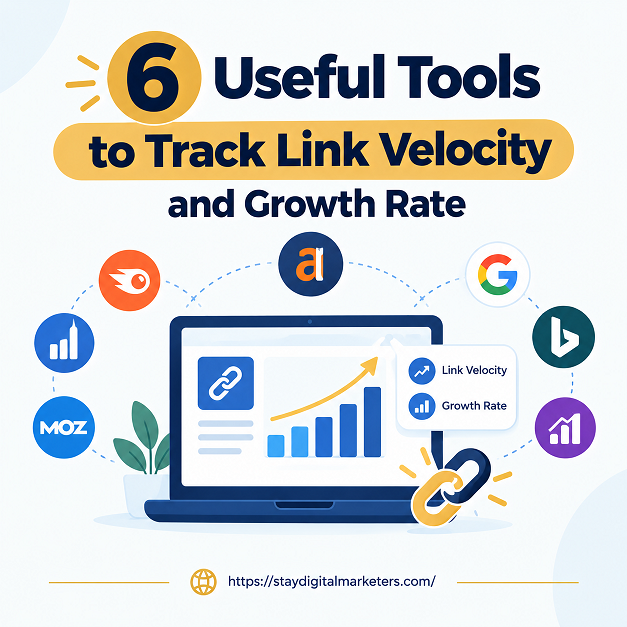
All six tools below show new and lost links over time. They differ in index freshness, alert frequency, and price.
The Ahrefs New and Lost backlinks report groups links by month, which maps neatly onto the 30-day blocks in steps one to three. Switch the view to referring domains, export each block, and you have a net velocity series in minutes. It is a paid tool, and its index is large enough to run the same report on competitors.
Semrush Backlink Analytics includes a graph of new and lost referring domains. That is net velocity drawn for you. Because the report runs on any domain, it is a quick way to gather the three competitor figures for step four.
Majestic keeps two indexes. The Fresh index covers roughly the last four months, while the Historic index goes back to 2006. Comparing the two shows whether recent link gains match a site’s long-term pattern or break from it, which is a useful sanity check before you call a spike unusual.
Linkody checks your backlinks every 24 hours and flags new and lost links, so a drop surfaces within a day instead of at the next monthly review. It offers a 30-day trial, and plans are reported to start at $11.20 per month on annual billing.
SE Ranking bundles its Backlink Monitor into a wider platform that also tracks keyword positions. That lets you overlay link changes on ranking changes in one place. Plans are reported by thecmo.com to start around $103.20 per month on annual billing, so confirm the current tier before you commit.
The Search Console Links report is free and shows the links Google itself has found to your site, including top linking sites and top linked pages. Because it shows a current snapshot rather than a new-versus-lost chart, export it every month and keep the files. A folder of twelve exports becomes your own trend line at no cost.
The table summarises what each tool does best and what to expect on price. Prices marked reported come from third-party sources and may have changed.
| Tool | Best for | Time coverage | Price (as of Oct 2026) |
| Ahrefs | Monthly new and lost reports | Links grouped by month | Paid; see pricing page |
| Semrush | Referring domain trend graphs | New and lost graph over time | Paid; see pricing page |
| Majestic | Fresh versus Historic comparison | Fresh about 4 months; Historic since 2006 | Paid; see pricing page |
| Linkody | Daily monitoring | Checks every 24 hours | From $11.20 per month, annual (reported); 30-day trial |
| SE Ranking | Teams that also track rankings | Ongoing backlink monitoring | From about $103.20 per month, annual (reported) |
| Google Search Console | Free baseline data | Current snapshot; export monthly | Free |
Small sites do well with Search Console plus Linkody: free baseline data and cheap daily alerts. Agencies and in-house teams that need competitor benchmarks should lean on Ahrefs or Semrush, since step four of the framework depends on running the same report across several domains. Add Majestic when you want a second opinion on whether recent growth is out of character.
Link velocity is the rate at which a website gains backlinks over a set period, usually calculated as new links divided by days. It is a monitoring metric rather than a confirmed Google ranking factor, and it is most useful when read as net growth: new referring domains minus lost ones.
There is no confirmed evidence that it is. John Mueller has said the rate of link growth is not the concern, only whether links look natural, and Gary Illyes has called link velocity a made-up term. Treat it as a diagnostic for spotting unusual spikes, not a number to hit.
Subtract links lost from links gained over a period to get net growth, then divide by the starting total and multiply by 100 for a percentage. Counting referring domains instead of raw links gives a cleaner figure, because one sitewide link can add thousands of links from a single source.
Google Search Console is the best free option because it reports the links Google has found to your site. It gives a snapshot rather than a new-versus-lost chart, so export the Links report monthly and compare the files. Linkody also offers a 30-day trial for daily monitoring.
Review it monthly for most sites, using three 30-day blocks to smooth out noise. Switch to daily or weekly alerts only during active campaigns or when you suspect negative SEO. Tools such as Linkody check every 24 hours, so lost links surface within a day.
No universal number exists. A healthy pattern is positive net growth that sits near the median of three ranking competitors over the same 90 days, with every spike traceable to a known cause such as a press mention or campaign. Benchmark against competitors, not against a fixed target.
Link velocity is one input among many. Link quality, relevance, anchor variety, and content depth carry more weight than any growth rate, and the tools above work best as an early warning system for those factors. Stay Digital Marketers assists brands with backlink-related services, including guest posting, press release distribution, SaaS backlinks, niche edits, multilingual backlinks, Wikipedia page creation, Google Knowledge Panel creation, and complete SEO services.
Disclaimer: Pricing and feature notes reflect publicly reported information as of October 7, 2026. Vendors change plans often, so confirm each figure on the pricing page before you buy.

Filza Taj is an MPhil in Human Resources-turned SEO Specialist, Content Strategist, and Digital Marketing Consultant with over 5 years of experience helping businesses in 30+ countries grow online. As the Founder of Stay Digital Marketers (staydigitalmarketers.com), she delivers results-driven solutions in link building, guest posting, PR distribution, niche edits, multilingual backlinks, and content marketing. She publishes daily SEO insights and actionable strategies to help brands strengthen their online presence, attract the right audience, and convert clicks into loyal customers.
Filza@staydigitalmarketers.com
Stay Digital Marketers
Need SEO, Link Building or Digital Marketing Services?
Request a Free Audit →