
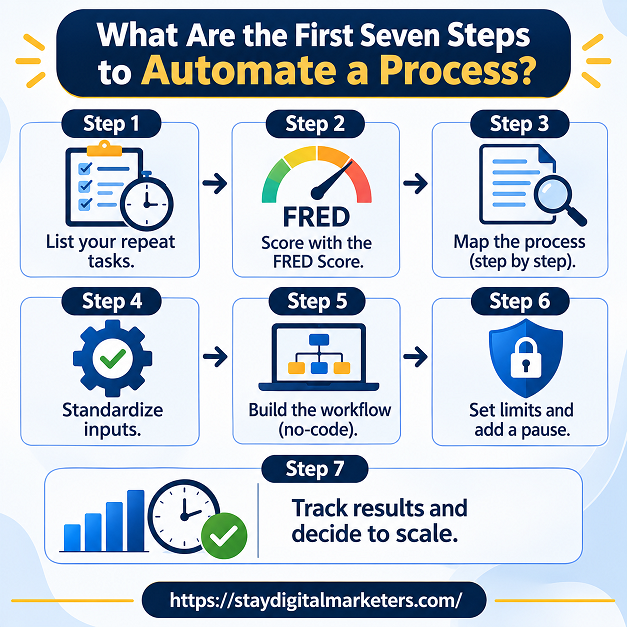
To automate your business, start with one repeating task, write down its steps, and score it for frequency, rules, error cost, and data quality. Build a simple workflow with a human check, and measure hours saved after a month. Most small firms are still early, with about 18 percent using AI in Census data.
Business automation means using software to do repeatable work without a person performing each step. A workflow starts with a trigger, such as a form submission, and then runs actions, such as creating a contact, sending an email, or updating a spreadsheet.
A few terms help. No-code platforms such as Zapier, Make, and n8n connect apps through triggers and actions. Robotic process automation copies clicks on a screen. AI tools add judgment, such as drafting a reply or sorting messages. Agents chain several AI steps together. Most small businesses begin with the first group and add AI where language is involved.
Key Takeaways
The questions are practical and slightly anxious. Quora listings show people asking how to start automating when they do not know where to begin, what the best ways are to automate processes in a small business, and how to automate a business and spend little time running it. On Reddit, a non-technical solo founder asked how to handle follow-ups, customer data, and reports without learning code. Another thread asked small business owners to share their biggest AI mistakes.
The advice in the Reddit threads I could read was consistent. Fix the process before adding automation, automate two or three high-friction tasks first, write out the manual steps before choosing software, keep a human editing step, and be most careful with anything customers see. Several commenters also promoted their own products, so treat tool recommendations with caution.
Fewer than headlines suggest, and the answer depends on how the survey asks. The US Census Bureau’s Business Trends and Outlook Survey found AI use between 17 and 20 percent of businesses from December 14, 2025 to May 3, 2026. Firms with 250 or more employees reached 37 percent, while firms with four or fewer employees stayed under 20 percent.
Other surveys report far higher numbers. A Federal Reserve note published on April 3, 2026 compared them. The Census survey showed about 18 percent in December 2025, while the Atlanta Fed’s Survey of Business Uncertainty reported 69.4 percent of firms using AI in November 2025. The note points to sample mix as a main reason: 89.6 percent of Census sample firms had 1 to 49 employees, against 38.2 percent in the Atlanta Fed survey. It also notes the Census question was broadened in November 2025, so older figures do not compare directly.
| Source | What was measured | Figure | Reading |
| Census BTOS, Dec 2025 to May 2026 | Businesses using AI in any function | 17 to 20 percent; 37 percent at 250+ employees | Nationally representative; many small firms |
| Atlanta Fed SBU, Nov 2025 | Firms using AI, equal-weighted | 69.4 percent (1,032 responses) | Executives; fewer tiny firms |
| JPMorgan Chase Institute, end 2025 (via Small Biz Talks) | Adopters from transaction data | 17.7 percent, up from 5.2 percent in 2023 | Secondhand; matches Census |
| business.com and Dialog, Jan 2026 | SMBs investing in AI, 1,009 workers | 57 percent, up from 42 percent in 2024 | Online survey; 2 to 250 employees |
The practical reading is that both can be true. Surveys that count any use, such as drafting an email with a chatbot, produce high numbers. Surveys asking about real business use produce lower ones. Business.com’s report adds that only 19 percent of respondents had used workflow automation tools in the past year, against 84 percent for chatbots.
Self-reported figures suggest a few hours a week, but nobody has audited them. Business.com and Dialog’s 2026 report found an average of 5.6 hours saved per week among respondents, with managers saving 7.2 hours and individual contributors 3.4. Thryv’s April 2026 survey of 561 owners, relayed by Small Biz Talks, found 92 percent of AI users say it saves time.
Treat these as direction, not proof. They measure what people believe they saved, and they come from AI users broadly, not workflow automation specifically. Your own baseline is the only number that settles the question for your business.
Two things. First, they repeat adoption statistics without explaining why they disagree, which leaves beginners thinking everyone else has already automated. The Census data and the Federal Reserve note show most small firms are still early. The SBA Office of Advocacy figure relayed by Small Biz Talks adds that 77 percent of non-adopters see no applicable use case.
Second, they rarely give a method for choosing a task or deciding how much human checking it needs. Observed across client work, owners automate what annoys them most, not what suits automation best, and then abandon the workflow when it misfires. The next two sections fix that.
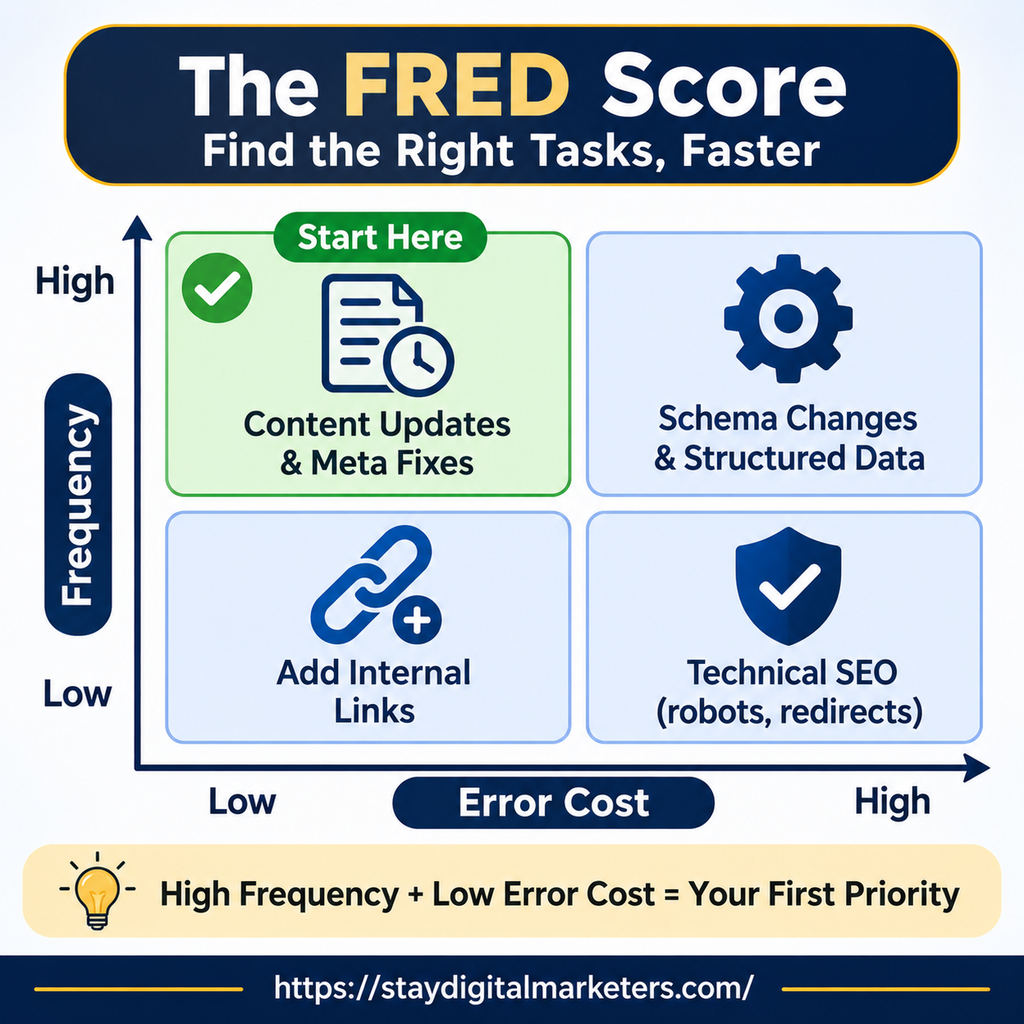
The FRED Score is an editorial rule of thumb for ranking tasks, not a research finding. Score each task from 1 to 3 on four factors and add them up.
| Factor | Question | Score 3 | Score 1 |
| F: Frequency | How often does it repeat? | Daily or weekly | A few times a year |
| R: Rules | Can you write the steps down? | Fixed steps, no judgment | Depends on judgment |
| E: Error cost | What if it goes wrong? | Minor and easy to fix | Costly or hard to undo |
| D: Data | Is the input clean and in one place? | Structured and consistent | Messy or scattered |
A total of 10 to 12 means automate now. A total of 7 to 9 means automate the preparation and keep a person in the loop. A total of 6 or less means leave it manual for now. An overdue invoice reminder might score 3, 3, 2, and 3 for a total of 11. A contract renegotiation might score 6 or less. These scores are illustrations, so apply the test to your own tasks.
Human Checkpoint Levels turn the FRED total into a review rule. They answer the question the Reddit threads kept raising: where does a person stay involved?
| Level | Meaning | Use when | Example |
| 0 | Runs on its own | FRED 11 to 12, internal only | Copy a form entry to a sheet |
| 1 | Spot-check samples | FRED 10 to 11, low risk | Weekly report sent internally |
| 2 | Person approves before it goes out | FRED 7 to 9 or customer-facing | Follow-up email drafted by AI |
| 3 | Person does it; software assists | FRED 6 or less | Contract or tax decisions |
Customer-facing work gets Level 2 at least. Internal work can start at Level 1 and move to Level 0 only after weeks of clean results.
Start where the FRED Score is high and a failure would stay inside the business.
Send each new enquiry to one place and trigger a first reply that a person has approved the wording of. Review the first few weeks of messages by hand.
Reminders follow clear rules, but timing matters. One small business owner described reminders going out on a Saturday and drawing an angry complaint, so set sending windows and keep a person for disputes.
Booking links and weekly summaries save repeated effort and rarely reach a customer when they fail. They suit Level 0 or 1 early on.
Sorting incoming messages by topic is a good AI task. Replying to them is riskier, so keep Level 2 until the sorting proves reliable.
| Need | Tool type | Examples | Watch for |
| Connect apps | No-code workflow platform | Zapier, Make, n8n | Task limits and maintenance |
| Draft or sort text | AI assistant | Claude, ChatGPT | Check outputs before sending |
| Capture data | Forms and spreadsheets | Google Forms, Sheets | Messy inputs break workflows |
| Track results | Spreadsheet or dashboard | Sheets, Looker Studio | Needs a recorded baseline |
Reddit commenters repeated one point: go deep on one tool for one problem instead of stacking subscriptions. The process matters more than the platform.
Automation scales whatever already exists. If the manual process is inconsistent, the automated one is inconsistent faster.
An illustrator running her own business described ticking off a 250-task list in her client system, where each tick triggered an action, and sending about 260 proposal emails, including one to a client she had not spoken to since 2021. Limits and test runs prevent this.
Internal use is forgiving. Customer-facing automation damages relationships when it fails, so keep Level 2 checks.
The same illustrator shut her system down after one complaint, then paid for an unused tool for over a year. A better response is to adjust the workflow and keep what works.
Tools change, forms change, and owners forget how things work. Put a quarterly review in the calendar.
Avoid work that depends on judgment you cannot write as rules, carries a high cost if wrong, or feeds other automations. A July 2026 guide from 13Labs lists financial postings, tax and compliance, and customer-facing work where a failure would damage the relationship, and it warns that a quiet error in one automation compounds when it feeds another. Automate the preparation, such as gathering documents or drafting a summary, and keep a named person responsible for the decision.
Record a baseline before you automate: hours spent, error rate, and time from request to completion. Review the same numbers monthly. Include the time you spend fixing the workflow, because a tool that saves two hours and costs three to maintain is a loss. Business.com’s 5.6-hour average is a useful benchmark to compare against, but your own record is the evidence that counts.
Plan for steady, small gains rather than a single transformation. The Census Bureau found 20 to 23 percent of businesses expect to use AI within six months, and the Federal Reserve note reports over 20 percent expecting to use it in the first half of 2026. Adoption is rising from a low base.
A sensible plan for the coming year is one new workflow per quarter, each scored with the FRED Score, assigned a checkpoint level, and reviewed after a month. Check the rules on customer data and automated decisions where you operate, since they are changing in several places.
Draw the FRED Score as a two-by-two grid with frequency on one axis and error cost on the other, and place the Human Checkpoint Levels as colour bands across it. Shade the high-frequency, low-error-cost box as the place to start. Readers can use it to sort their own task list, which makes it more shareable than a logo chart of tools.
Choose one repeating task, write its steps in plain language, and build it in a no-code tool such as Zapier, Make, or n8n. Add a human approval step before anything reaches a customer. Run it for a month, record the hours saved, and only then add a second workflow.
Start with tasks that repeat often, follow clear rules, and cost little if they fail. Good first picks are invoice reminders, lead follow-up emails, appointment scheduling, and weekly reports. Score each candidate with the FRED Score and begin with the highest total, not the task that annoys you most.
Surveys suggest yes, but the evidence is self-reported. Business.com and Dialog’s 2026 report found AI users save an average of 5.6 hours a week, and Thryv’s April 2026 survey found 92 percent of AI-using owners say it saves time. Neither is audited, so record your own baseline.
Automation follows fixed rules, such as sending an email when a form is submitted. AI adds judgment, such as drafting a reply or sorting messages by topic. Most useful workflows combine both. Keep the rules in the automation, use AI for the language-heavy steps, and keep a person responsible for risky decisions.
It depends on the survey. The Census Bureau found 17 to 20 percent of businesses using AI between December 2025 and May 2026, while an Atlanta Fed survey reported 69.4 percent of firms in November 2025. A Federal Reserve note says sample size mix and question wording explain most of the gap.
Avoid automating work that depends on judgment you cannot write as rules, carries a high cost if wrong, or feeds other automations. Financial postings, tax and compliance decisions, and sensitive customer conversations belong here. Automate the preparation around them, such as gathering documents, and keep a named person responsible for the final decision.
Record a baseline before you automate: hours spent, error rate, and time from request to completion. Compare the same numbers monthly and include the time you spend maintaining the workflow. If hours saved do not exceed maintenance time, simplify the workflow or switch it off.
Start with one task, score it, run it by hand three times, automate it with a human check, and measure the result before adding another. Stay Digital Marketers assists brands with guest posting, press release distribution, SaaS backlinks, niche edits, multilingual backlinks, Wikipedia page creation, Google Knowledge Panel creation, and complete SEO services.

Filza Taj is an MPhil in Human Resources-turned SEO Specialist, Content Strategist, and Digital Marketing Consultant with over 5 years of experience helping businesses in 30+ countries grow online. As the Founder of Stay Digital Marketers (staydigitalmarketers.com), she delivers results-driven solutions in link building, guest posting, PR distribution, niche edits, multilingual backlinks, and content marketing. She publishes daily SEO insights and actionable strategies to help brands strengthen their online presence, attract the right audience, and convert clicks into loyal customers.
Filza@staydigitalmarketers.com
Stay Digital Marketers
Need SEO, Link Building or Digital Marketing Services?
Request a Free Audit →