Call or WhatsApp us anytime
Mail Us For Support

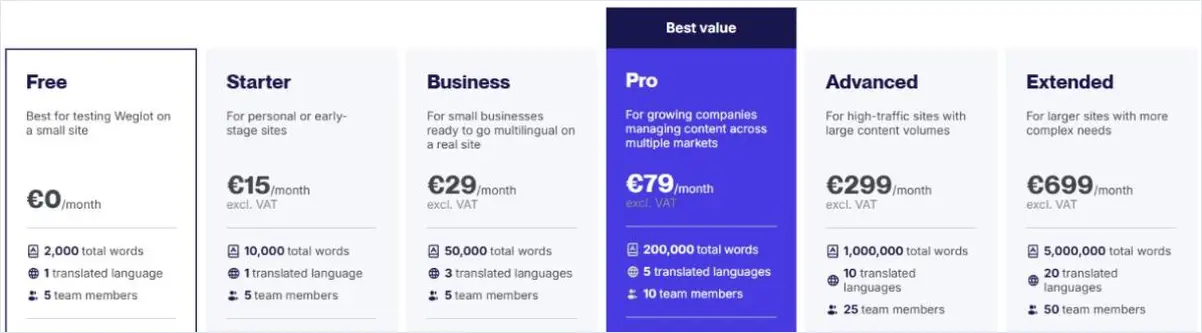
Weglot is a cloud translation service priced by words and languages, while WPML, TranslatePress and Polylang are WordPress plugins with yearly licences that store translations on your own site. For a typical three-language business site, the three plugins cost about €99 a year, while Weglot costs €348 a year on Business or €948 a year on Pro, which is the first plan with translated URLs.
This comparison covers the SEO features, pricing and speed considerations that decide which tool ranks a multilingual WordPress site best. Prices were read from each vendor’s pricing page in November 2026, except TranslatePress, whose figures come from a third-party pricing listing checked the same month.
Key Takeaways
The main difference is where translations live: Weglot keeps them on its own cloud platform, while the three plugins keep them in the WordPress database. That one choice shapes pricing, ownership, editing workflow and how each tool affects page speed.
Plugin translations stay on your site when a licence expires, while Weglot translations depend on an active subscription. Polylang states that an expired licence only ends updates and support, and the plugin keeps working. WPML and TranslatePress translations remain in the database as well. Weglot users should export translations before cancelling, because the translated pages are served through its platform.
All four tools can produce separate URLs per language with automatic hreflang, but they differ on slug translation, metadata translation and which plan includes each feature. The table compares the features that most affect multilingual rankings.
| SEO feature | Weglot | WPML | TranslatePress | Polylang |
|---|---|---|---|---|
| Separate URL per language | Yes | Yes | Yes | Yes |
| Automatic hreflang | Yes | Yes | Yes | Yes |
| Translated post slugs | Pro plan and above | Yes, each translation is its own post | SEO Pack (premium) | Yes; CPT and taxonomy slugs in Pro |
| Translated titles and meta descriptions | Yes | Yes | SEO Pack (premium) | Yes |
| URL formats | Subdirectory or subdomain, by platform | Subdirectory, subdomain or domain | Subdirectory by default | Subdirectory, subdomain or domain |
| Where translations live | Weglot platform | WordPress posts | WordPress tables | WordPress posts |
Hreflang support only helps when the annotations are complete and reciprocal. Google’s documentation on localized versions of a page states that tags are ignored when two pages do not point to each other, so a page translated into only some languages still needs checking after launch. The broader setup rules are covered in the multilingual SEO handbook.
WPML and Polylang give the most control, because every translation is a normal WordPress post with its own slug, SEO title, meta description, canonical and internal links. SEO plugins such as Yoast treat each translation like any other page, so editors can optimize each language version individually.
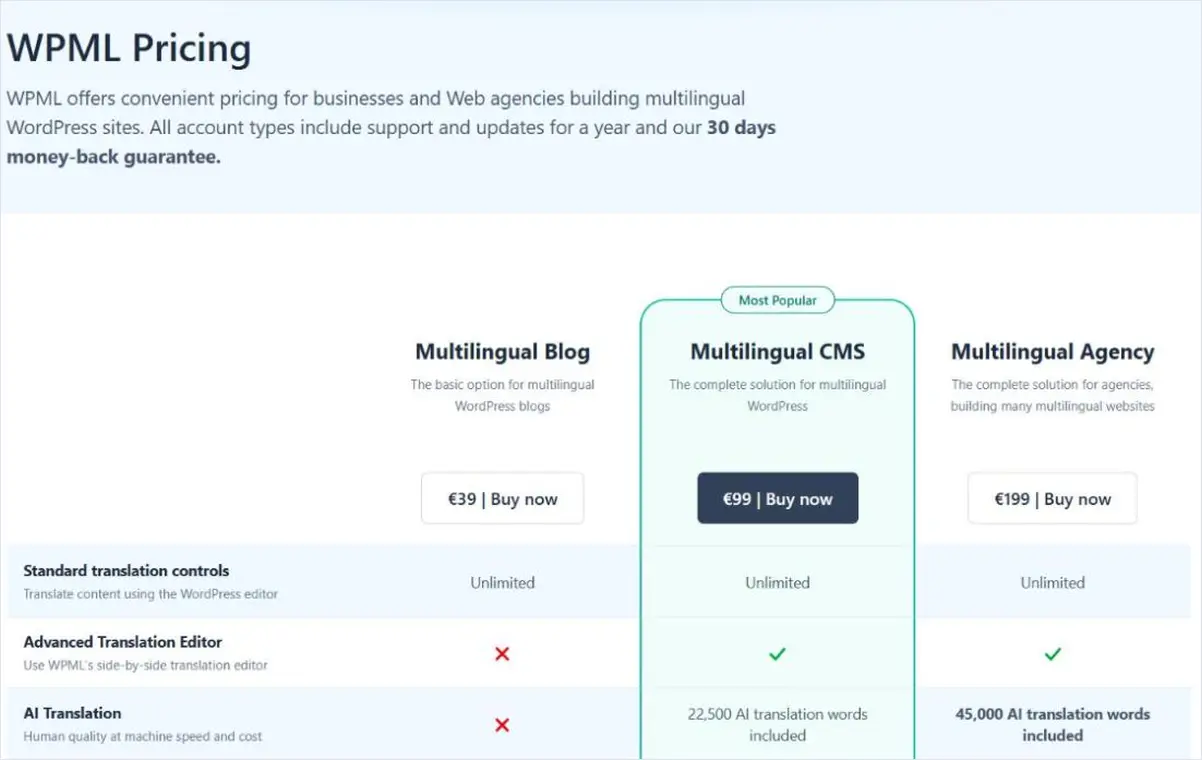
The plugins charge a yearly licence, while Weglot charges monthly by words and languages, so Weglot costs more as a site grows. The table shows year-one prices for a business site translated into three languages.
| Tool and plan | Price | Year-one cost | Limits that matter |
|---|---|---|---|
| Weglot Business | €29/month | €348 | 50,000 words, 3 languages, no translated URLs |
| Weglot Pro | €79/month | €948 | 200,000 words, 5 languages, translated URLs |
| WPML Multilingual CMS | €99/year | €99 | 3 production sites, 22,500 AI words |
| TranslatePress Personal | About €99/year | About €99 | 1 site, 50,000 AI words listed |
| Polylang Pro | From €99/year | €99 | DeepL needs your own API key |
Weglot prices are monthly billing excluding VAT; its annual billing gives two months free. WPML includes support and updates for a year with a 30-day money-back guarantee, and Polylang discounts renewals by 50%. Plugin costs exclude the time needed to translate or review content, which Weglot automates.
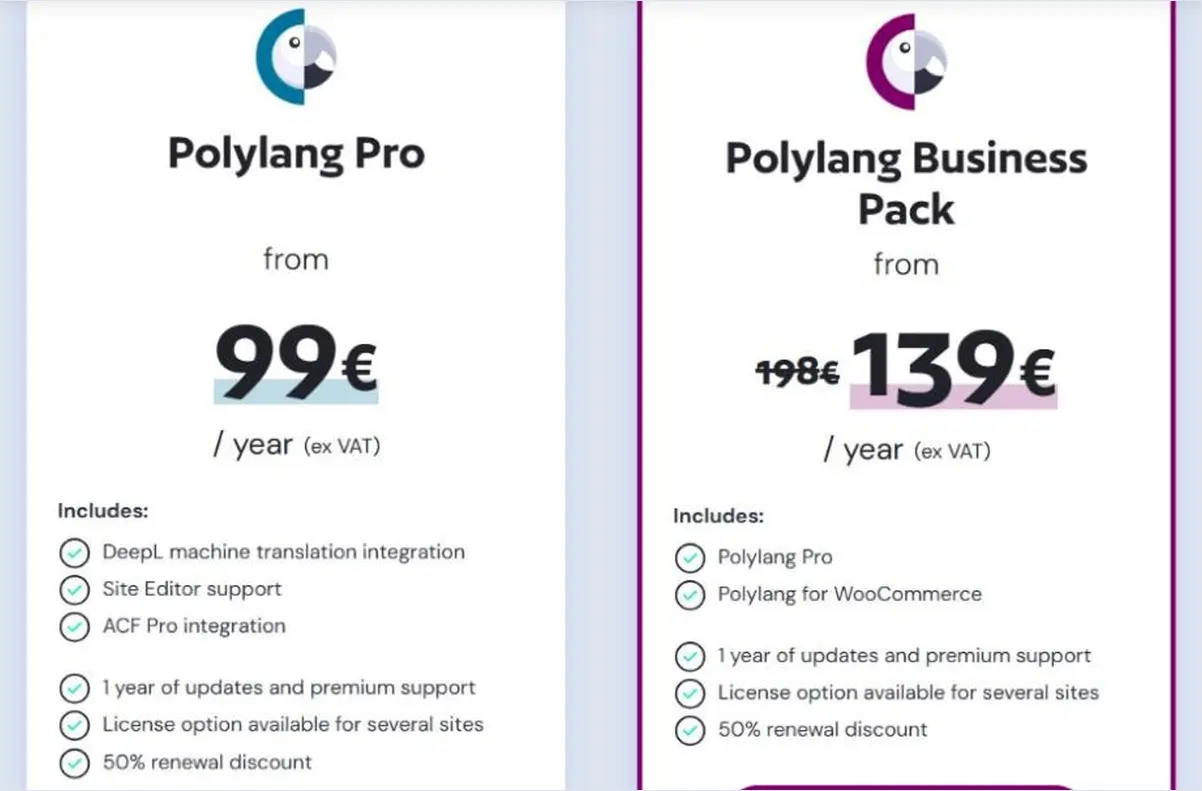
WPML covers WooCommerce and page builders on its CMS plan, Polylang needs the Business Pack for WooCommerce, and Weglot and TranslatePress translate whatever the front end displays. Store owners should check this before comparing prices.
Large stores feel the word limit most. A catalogue of 500 products with 150-word descriptions already holds 75,000 words before category pages, blog posts and checkout text are counted, and every additional language multiplies that total.
No tool is fastest in every setup, because speed depends on hosting, caching and page builders more than on the translation plugin itself. Each architecture adds a different kind of work, and good caching reduces all of them.
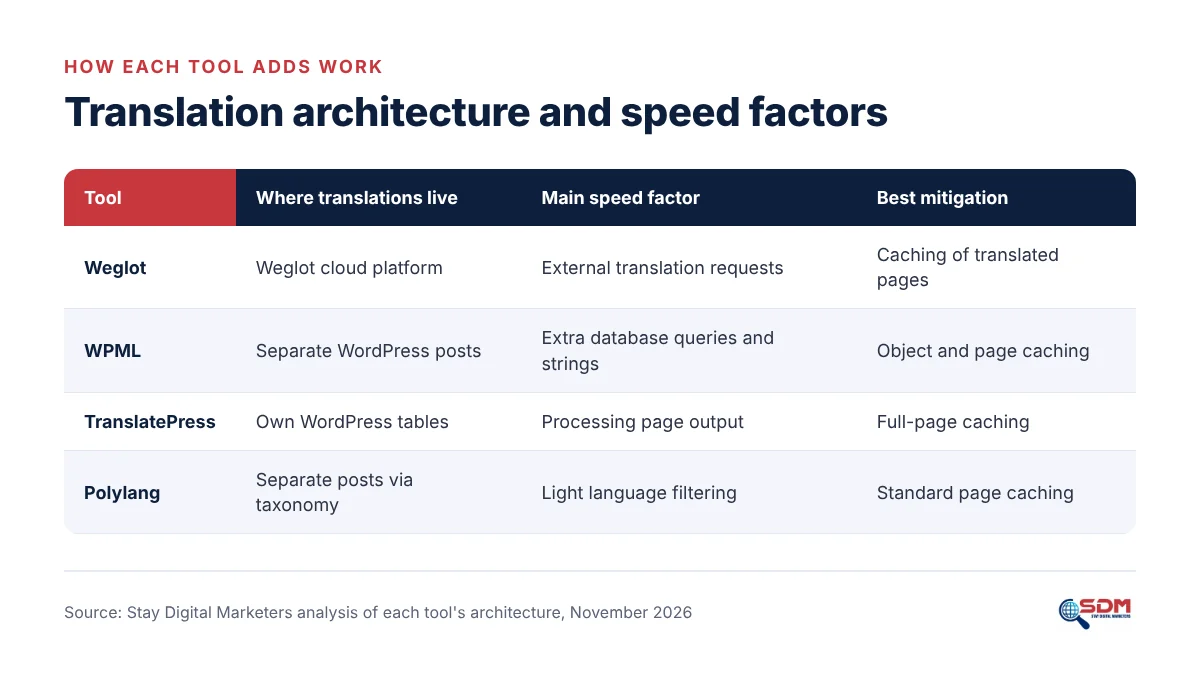
Measure rather than assume. Test the same translated page before and after installing a plugin, using field data where available and the Core Web Vitals thresholds as the benchmark. Speed problems after adding a translation plugin usually come from uncached pages or heavy page builders.
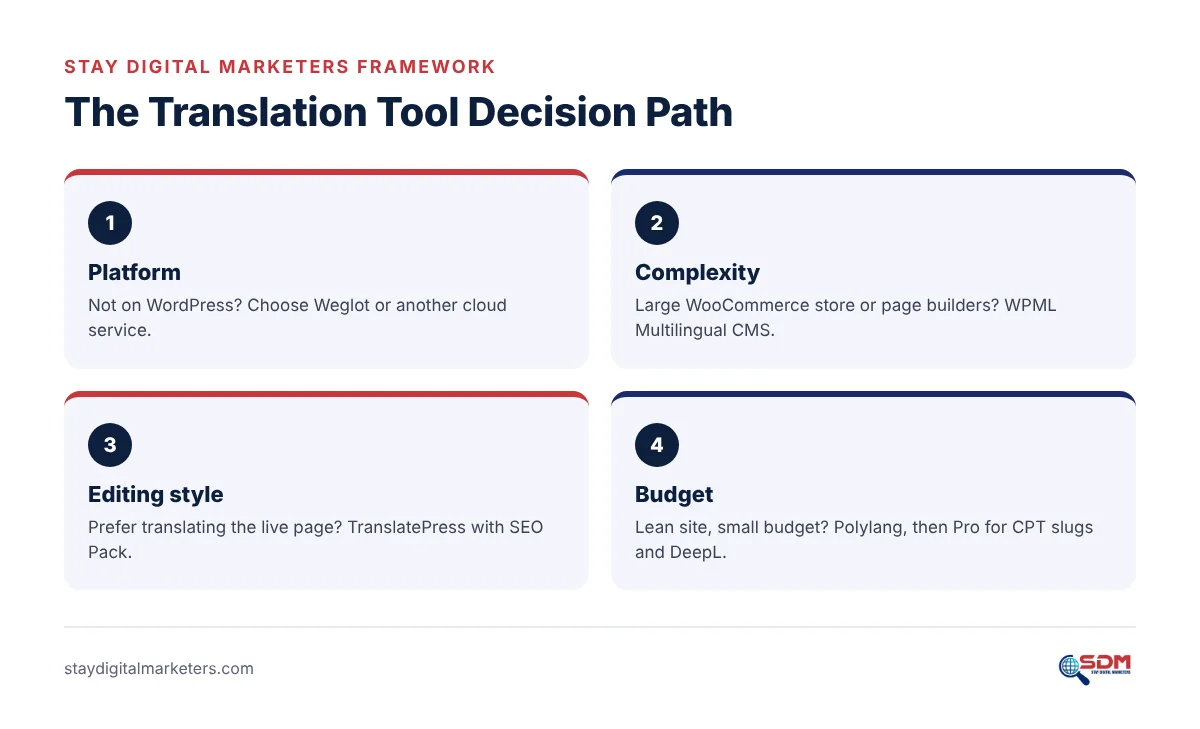
Choose Polylang for a lean, low-cost WordPress setup, WPML for complex sites with WooCommerce and page builders, TranslatePress for visual editing, and Weglot for non-WordPress platforms or teams that want translation fully automated. The Translation Tool Decision Path below shows the order of questions.
Teams still deciding whether to leave Weglot can compare more options in this list of Weglot alternatives.
The supporting crawlers and keyword tools for each language are covered in this guide to multilingual SEO tools.
A pattern observed across client work is that the plugin choice matters less than what happens after launch. Sites that review machine translations, translate metadata and earn links from local sites outrank sites with a more expensive tool and untouched automatic translations. Businesses that want the WordPress setup handled for them can look at professional WordPress development services.
Both can rank well. WPML gives more control because each translation is a real WordPress post with its own slug, metadata and canonical, on every plan. Weglot handles SEO automatically, but translated URLs only start on the Pro plan at €79 per month, as of November 2026. Review translations either way.
For SEO, Polylang free is usually stronger because it supports multiple languages and creates separate indexable posts for each translation. TranslatePress free is limited to one additional language, and its SEO Pack for translated slugs and metadata is a premium add-on. TranslatePress is easier for visual, on-page editing.
WPML, Polylang and TranslatePress charge yearly licences that do not rise with each language you add, so they are usually cheapest for many languages. Weglot’s plans cap languages, from one on Starter to twenty on Extended. AI translation credits and human review are separate costs with every option.
Every translation plugin adds some work, such as database queries, output processing or external requests. Good page caching usually removes most of the impact. Test the same page before and after installing the plugin, and check Core Web Vitals field data rather than relying on general speed claims.
Yes. Export your translations from Weglot first, then import or recreate them in WPML on a staging site. Keep the same translated URLs where possible, or add 301 redirects for any that change, and check hreflang and canonicals before going live to protect existing rankings.
Stay Digital Marketers is one resource that helps brands grow each language version after launch, with guest posting, press release distribution, SaaS backlinks, niche edits, multilingual backlinks, Wikipedia page creation, Google Knowledge Panel creation and complete SEO services across 30+ countries.

Filza Taj is an MPhil in Human Resources-turned SEO Specialist, Content Strategist, and Digital Marketing Consultant with over 5 years of experience helping businesses in 30+ countries grow online. As the Founder of Stay Digital Marketers (staydigitalmarketers.com), she delivers results-driven solutions in link building, guest posting, PR distribution, niche edits, multilingual backlinks, and content marketing. She publishes daily SEO insights and actionable strategies to help brands strengthen their online presence, attract the right audience, and convert clicks into loyal customers.
Filza@staydigitalmarketers.com
Stay Digital Marketers
Grow Your Brand on Google, in AI Answers and on Autopilot
SEO, Link Building and AI Automation by Stay Digital Marketers
Get Your Growth Plan →