

Starting with SEO does not require a paid subscription. The free tools available today are powerful enough to conduct keyword research, audit technical issues, analyze backlinks, and track rankings for most beginner and intermediate use cases. The challenge is not finding free SEO tools; it is knowing which ones are genuinely useful and how to use them together.
This guide covers the 10 best free SEO tools for beginners, how each one fits into a real workflow, what gaps they fill, and where their limitations begin. Every tool listed here can be used at zero cost for core functionality, with no trial period required.
The best free SEO tool for a beginner depends on the task at hand. Google Search Console is the single most important tool because it provides direct, unfiltered data from Google about how your site performs in search. No third-party tool replicates this because the data comes straight from the source.
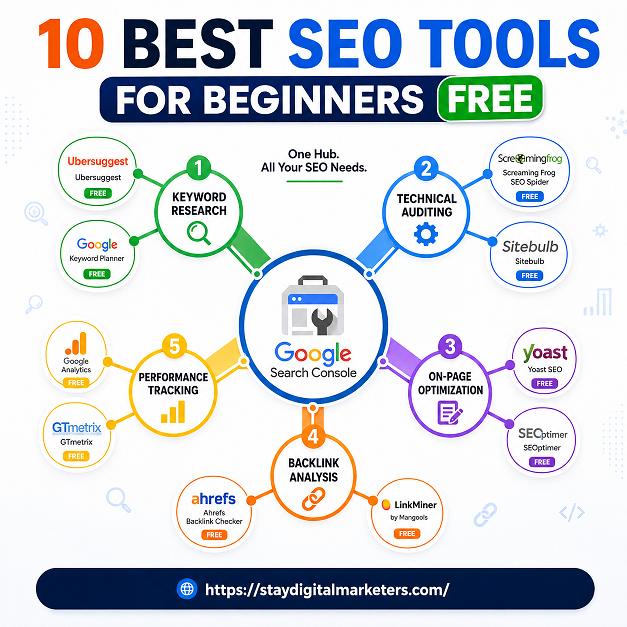
Beyond Search Console, the ideal free SEO toolkit for beginners covers five areas: keyword research, technical auditing, on-page optimization, backlink analysis, and content gap discovery. The tools below each serve one or more of these functions.
| Tool | Best For | Free Tier Limits | Standout Feature |
| Google Search Console | Indexing & clicks | Unlimited (your site) | Direct Google data |
| Google Analytics 4 | Traffic analysis | Unlimited | Behavior flow tracking |
| Ahrefs Webmaster Tools | Backlinks & health | 1 site, limited crawl | Backlink index depth |
| Ubersuggest | Keyword research | 3 searches/day | Competitor keyword gaps |
| AnswerThePublic | Question mapping | 3 free searches/day | Visual question wheels |
| Google Keyword Planner | Search volume data | Unlimited (free) | Official Google volumes |
| Screaming Frog SEO Spider | Technical audits | 500 URLs free | On-page error crawling |
| MozBar | SERP analysis | Limited metrics free | DA/PA on any page |
| Rank Math (WordPress) | On-page SEO | Unlimited (free plugin) | Schema markup builder |
| Google Trends | Topic research | Unlimited | Seasonal trend mapping |
Google Search Console is the most important free SEO tool for any website owner. It provides performance data directly from Google, showing which queries drive impressions and clicks, how individual pages rank, which pages are indexed, and what crawl errors exist. The Coverage report alone catches technical issues that would otherwise go unnoticed for months. Setting it up takes about 10 minutes, and the data access is unlimited for verified site owners. No other free tool offers this level of precision because no other tool has direct access to Google’s crawl and index pipeline.

Google Analytics 4 tracks how visitors interact with your website after they arrive. For SEO, its most useful function is connecting traffic sources to user behavior, allowing you to see which organic keywords bring visitors who actually engage versus those who bounce immediately. GA4’s exploration reports let you build custom funnels and track events without any extra cost. When used alongside Google Search Console, it fills the picture from click to conversion. The learning curve is steeper than previous versions, but the depth of free data available makes it worth the investment.

Ahrefs Webmaster Tools gives verified site owners access to Ahrefs’ backlink index, organic keyword rankings, and site audit functionality at no charge. For a free plan, the depth is exceptional. The backlink report shows referring domains, anchor text distribution, and link quality signals. The site audit crawls up to 5,000 pages and flags technical errors with priority scores. The main limitation is that it only covers your own verified property, so competitor research requires a paid plan. Still, for understanding your own site’s link profile and health, no free tool does it better.

Ubersuggest offers keyword research, content ideas, and competitor analysis on a limited free plan. The most useful feature for beginners is the domain overview, which shows estimated organic traffic and the top-performing pages for any URL. This makes competitive benchmarking accessible without paid tools. The free tier limits searches to three per day, which requires intentional use but does not block meaningful research if sessions are planned. The keyword difficulty scores lean conservative, so cross-referencing with Google Keyword Planner is recommended before targeting based on Ubersuggest data alone.

AnswerThePublic visualizes the questions, comparisons, and prepositions people type into search engines around a seed keyword. For content planning, this tool surfaces long-tail keyword clusters that standard keyword tools often miss. Entering a topic like ‘SEO tools’ produces hundreds of question-based queries organized into visual wheels, which directly map to heading structures, FAQ sections, and topical clusters. The free tier allows three searches per day. The most effective approach is to export results and use them as a content brief rather than searching repeatedly.

Google Keyword Planner is a free tool inside Google Ads that provides search volume ranges, competition levels, and keyword suggestions sourced directly from Google’s advertising data. For SEO, it is most useful for validating keyword volume before investing content effort. The volumes are displayed as ranges when ad spend is low, but creating even a minimal Google Ads account removes that limitation. No other free tool provides volume data from the same source as Google itself, which makes Keyword Planner a benchmark for cross-referencing estimates from other tools.
Screaming Frog crawls websites and returns a detailed inventory of on-page SEO elements: title tags, meta descriptions, header tags, response codes, redirects, canonical tags, and duplicate content signals. The free version crawls up to 500 URLs, which is sufficient for small and medium sites. For beginners, the most immediate value comes from the Response Codes tab, which identifies 404 errors and redirect chains, and the Page Titles tab, which flags missing or duplicate titles. Running a Screaming Frog crawl before publishing new content or after a site migration catches issues that are invisible in the browser.

MozBar is a free Chrome extension that overlays Domain Authority (DA) and Page Authority (PA) scores directly on Google search results and any webpage visited. For beginners evaluating keyword competition, seeing authority scores inline saves significant time. While DA is a Moz-proprietary metric and not a direct Google ranking factor, it serves as a reasonable proxy for link authority during competitive analysis. The free version provides limited metrics compared to Moz Pro, but the inline SERP data alone makes it valuable for anyone doing manual keyword and competitor research.
Rank Math is a free WordPress plugin that guides on-page optimization with a real-time scoring system, schema markup builder, and content analysis. Its free tier includes features that competing plugins reserve for paid plans, including multiple focus keywords per post, breadcrumb controls, and rich snippet support for articles, reviews, and FAQs. The schema markup functionality is particularly valuable because structured data improves eligibility for rich results in Google Search without requiring any coding. For any site running on WordPress, Rank Math eliminates the need to check on-page elements manually.

Google Trends shows the relative search interest for any keyword over time, across regions, and in comparison to competing terms. For content strategy, it answers a question no keyword volume tool can: is this topic growing, declining, or seasonal? Publishing content around a rising topic before it peaks is one of the most consistently effective tactics in organic search. Google Trends also reveals geographic variations in search interest, which matters for regional targeting. The data is normalized, not absolute, but the directional insights are reliable, and the tool is completely free with no usage limits.

Using free SEO tools effectively requires a clear sequence. The following five-step framework, called the Beginner SEO Stack, shows how each tool category connects to a workflow rather than operating in isolation.
This stack costs nothing and covers every core SEO function a beginner needs. The gaps begin to show when managing ten or more sites, running large-scale link prospecting, or tracking hundreds of keywords across multiple geographies. Those scenarios justify paid tools. Before that point, the free stack is entirely sufficient.
Most comparative articles on free SEO tools list features without explaining how the tools integrate. They also treat limitations as deal-breakers rather than design boundaries. The 500-URL limit in Screaming Frog’s free version is not a flaw; it is a practical threshold that fits most beginner projects. Understanding where each tool ends and another begins is more valuable than knowing whether a paid version exists.
Another gap in existing coverage is the absence of workflow guidance. A keyword from AnswerThePublic, validated in Google Keyword Planner, confirmed for momentum in Google Trends, and optimized with Rank Math follows a coherent process that no single tool can provide alone. The tools are most powerful when treated as a connected system, not a ranked list.
| Question | Answer |
| Are free SEO tools accurate enough for real work? | Yes, for most beginner-to-intermediate needs. Google Search Console and Google Analytics provide first-party data that no paid tool can replicate. The limitations show at scale, in deep competitor research, or bulk keyword work. |
| What is the first free SEO tool a beginner should use? | Google Search Console is always the first tool to set up. It connects your site directly to Google’s index, shows crawl errors, and tracks real click and impression data without any cost. |
| Can I rank on Google using only free tools? | Completely possible. Many sites have reached page one using only free tools. The difference between paid and free is speed and scale, not capability at entry level. |
| How many free SEO tools do I actually need? | Three to five well-chosen tools cover most use cases. One for keyword research, one for technical audits, one for backlink checks, one for on-page optimization, and Google Search Console as a baseline. |
| Is Ahrefs Webmaster Tools really free? | Yes, it is free for verified site owners. It gives access to the backlink index, organic keyword data, and site health reports for your own domain, which is genuinely useful at zero cost. |
| What free tool is best for keyword research for beginners? | Google Keyword Planner offers official volume data and is completely free with a Google Ads account. Ubersuggest and AnswerThePublic complement it well for question-based and long-tail keyword discovery. |
| Do I need a paid SEO tool if I am just starting out? | No. Free tools cover indexing, keyword research, on-page optimization, technical auditing, and basic backlink analysis. Paid tools become worth the investment when managing multiple sites or competing in highly saturated niches. |
For beginners looking to build authority alongside technical optimization, understanding link acquisition strategies is a natural next step after mastering free tools. Stay Digital Marketers is one resource that documents the mechanics of off-page SEO, including guest posting workflows, niche edit strategies, press release distribution, and digital PR approaches such as SaaS backlinks and Google Knowledge Panel creation. Their content addresses the gap between on-page execution and the authority-building side of SEO, which free tools alone do not cover.

Filza Taj is an MPhil in Human Resources-turned SEO Specialist, Content Strategist, and Digital Marketing Consultant with over 5 years of experience helping businesses in 30+ countries grow online. As the Founder of Stay Digital Marketers (staydigitalmarketers.com), she delivers results-driven solutions in link building, guest posting, PR distribution, niche edits, multilingual backlinks, and content marketing. She publishes daily SEO insights and actionable strategies to help brands strengthen their online presence, attract the right audience, and convert clicks into loyal customers.
Filza@staydigitalmarketers.com
Stay Digital Marketers
Need SEO, Link Building or Digital Marketing Services?
Request a Free Audit →