
A practical, spec-accurate build guide for 2026
An llms.txt file is a plain text document placed at the root of a website, at yoursite.com/llms.txt, that gives AI systems a curated summary of what a site is, which pages matter most, and how the brand should be described. It follows the llmstxt.org specification, first proposed in September 2024, and it works alongside robots.txt rather than replacing it. Where robots.txt controls whether a crawler can access a page at all, llms.txt adds editorial context on top: a short brand summary, a set of prioritized links, and plain language descriptions written for a language model rather than a search engine index.
The file matters because the way people find information has split into two paths. One still runs through ten blue links. The other runs through a chat window, where ChatGPT, Perplexity, Gemini, and Google AI Overviews synthesize an answer instead of listing sources. llms.txt was built for that second path. It hands a model a shortcut instead of forcing it to crawl and interpret thousands of pages on its own.
Key Takeaways
SaaS companies, documentation sites, publishers, and agencies with large content libraries benefit the most, since they have the most to gain from a model quickly understanding site structure. Small brochure sites with five pages get less lift, since a model can already read the whole site in seconds. Practitioners working across many client accounts tend to notice the same pattern: sites with deep blogs and scattered documentation see the clearest organizational benefit once a curated file exists, simply because it forces a single source of truth to be written down for the first time.
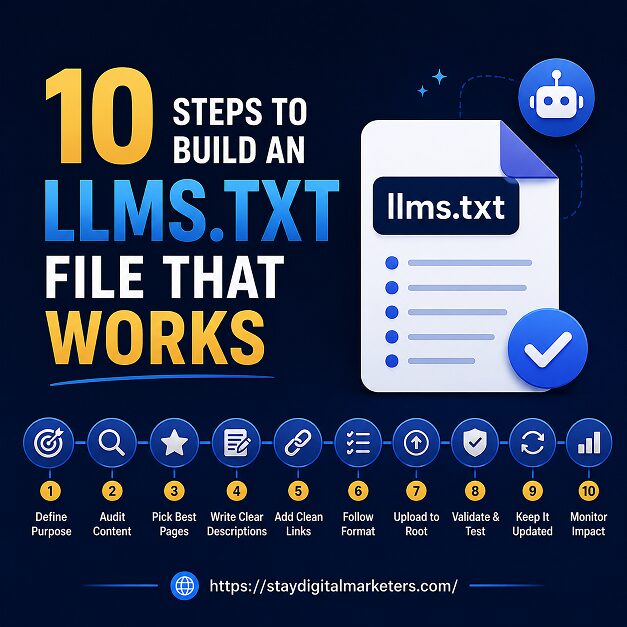
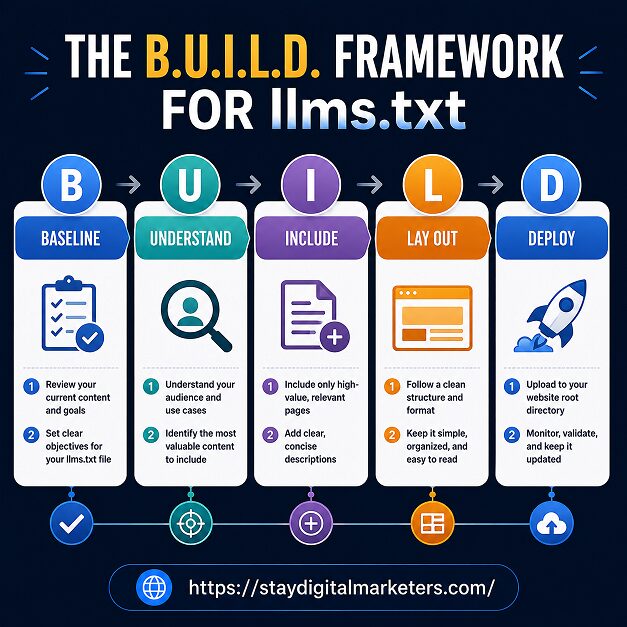
Ten steps are easier to execute when they are grouped into phases with a clear purpose. The B.U.I.L.D. framework organizes the process into five stages, Baseline, Understand, Include, Lay out, and Deploy, with two concrete steps inside each stage. Working through it in order prevents the most common failure mode: publishing a file built from guesswork instead of an actual content audit.
Before writing a single line, pull a full list of every indexed page on the site. Export the sitemap, run a crawl, and sort pages by traffic, conversion value, and topical authority. This audit becomes the raw material for every decision that follows, and skipping it is the single most common reason llms.txt files end up generic and unhelpful.
Separate content into three buckets: what defines the brand, what a customer would ask an AI model about, and what is purely internal or legal. AI systems answering a question do not need a careers page or a cookie policy in front of them. They need the pages that answer real buyer and research questions.
The llmstxt.org format has exactly one required element: a single H1 title naming the site. Everything else, the blockquote summary, context paragraphs, and H2 sections of links, is optional but strongly recommended. Reading the spec directly, rather than copying a template blindly, prevents structural mistakes that make a file harder for a model to parse correctly.
Most working files use three to five H2 sections: Product or Services, Resources or Documentation, Company, and an Optional section for lower-priority pages like changelogs or terms of service. The Optional heading is a reserved term in the spec. It signals to a model that those links can be skipped first if it needs to shorten the context it pulls in.
Ten to thirty links is the practical range for most sites. List more and the file stops functioning as a curated summary and starts duplicating the sitemap. Rank candidate pages by how well each one answers a question a prospective customer or researcher would actually type into an AI tool, then cut the list down to the pages that earn their place.
Each link needs a description that makes sense without a click. Across a wide range of client accounts, the most common quality problem is not missing pages but descriptions that could apply to any company. A generic line like our pricing page tells a model nothing; a specific line stating plan names, price points, and what is included in each tier gives it something to actually cite.
Format follows a fixed order: the H1 title first, then the blockquote summary marked with the greater-than symbol, then optional context paragraphs, then H2 sections with markdown-style link lists. Each list item follows the pattern of a linked page title, followed by a colon, followed by a one-line description. Getting this order wrong is a frequent source of parsing failures.
With the audit, sections, and descriptions ready, assembling the actual file becomes fast. Write the H1, write the two or three sentence summary, add one supporting paragraph of factual detail such as scale, geography, or core offering, then populate each H2 section with its ranked links and descriptions. Keep the whole document under roughly ten kilobytes so it loads instantly for any system that requests it.
The file must live at yoursite.com/llms.txt, served as plain text over HTTPS, without any login wall in front of it. Static site generators like Hugo, Jekyll, and Gatsby serve it automatically from a public folder. WordPress sites need it uploaded to the root directory alongside wp-config.php, or handled through a plugin or htaccess rule. Platforms like Shopify require adding it as a theme asset. Confirm the response returns an HTTP 200 status and the correct content type before considering the job finished.
Visit the live URL directly to confirm it renders as raw text, not HTML. Check every linked URL for a working destination. Set a quarterly reminder to review the file whenever the site adds major pages, restructures navigation, or rebrands, since a stale file with broken links can do more harm than having no file at all.
The honest answer sits between the hype and the dismissal. Adoption has grown fast. Tracking research from Originality.ai, which monitored more than three million websites, found llms.txt implementations climbed roughly 8.8 times over, from around 4,088 sites in June 2025 to 36,120 by May 2026. Yet the same body of research found that the overwhelming majority of published files receive no measurable requests from AI crawlers at all.
Enterprise adoption tells a similar story. A ProGEO.ai study covering Fortune 500 companies, reported in PPC Land’s coverage from April 2026, found only 37 of 500 companies, roughly 7.4 percent, had published an llms.txt file as of March 2026, compared with 92.8 percent that had a robots.txt file. That gap reflects how long a new web convention takes to move from experimental to expected practice.
Separately, a 300,000-domain study from SE Ranking used a machine learning model to test whether llms.txt presence correlated with how often a site gets cited by AI systems. Removing the llms.txt variable from the model actually improved its prediction accuracy, meaning the file added no measurable citation signal in that dataset.
None of that makes the file worthless. It makes it a low-cost, low-certainty bet. Setup takes a few hours, the file does no harm, and IDE-based coding agents and some developer tools already reference it directly. Treat it as complementary to real structural content work such as clear headings, direct answers, and well-tagged FAQ sections, not as a replacement for that work.
The three files are often confused because they all live at the domain root, but each serves a different function, shown below.
| Aspect | llms.txt | robots.txt | sitemap.xml |
| Purpose | Curated summary and priority links for AI models | Grants or blocks crawler access by URL | Lists all indexable URLs for search engines |
| Required by spec | Only an H1 title is mandatory | Not required, but expected by convention | Not required, but expected by convention |
| Format | Markdown, plain text | Plain text with directives | XML |
| Read by AI systems today | Inconsistent, adoption still emerging | Widely respected by crawlers | Used mainly by search engines |
| File location | Domain root, /llms.txt | Domain root, /robots.txt | Domain root or referenced in robots.txt |
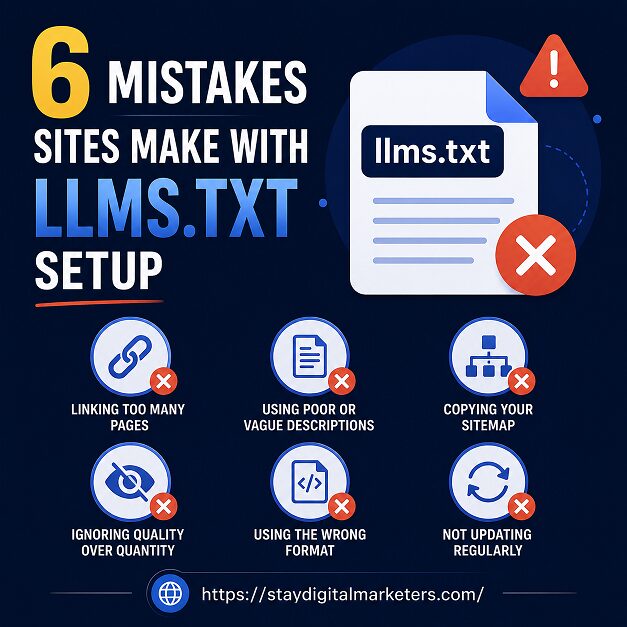
Wrong file location is the most frequent technical error, placing the file in a subfolder instead of the domain root. Serving it with an HTML content type instead of plain text is a close second. On the content side, vague descriptions, broken or redirected links, and listing hundreds of pages instead of a curated set all reduce the file’s usefulness even when the technical setup is correct. A missing H1 title or missing blockquote summary also leaves the file incomplete against the specification’s core requirements.
An llms.txt file is a plain text file hosted at a website’s root domain that summarizes a site’s purpose, priority pages, and brand description for AI systems to reference. It follows the llmstxt.org specification and uses simple markdown formatting rather than code or complex markup.
Place the file at the root of the domain so it loads at yoursite.com/llms.txt, the same convention used for robots.txt and sitemap.xml. It must be publicly accessible without a login and served with a plain text content type for AI systems to read it correctly.
Adoption is growing, but current research shows most AI crawlers do not consistently request or use llms.txt files yet. Independent tracking studies found the large majority of published files receive no measurable AI traffic, so treat the file as a low-cost future-proofing step rather than a guaranteed visibility gain.
No. robots.txt controls which pages crawlers are allowed to access, while llms.txt adds curated context on top, describing what a site does and which pages matter most. The two files serve complementary purposes and most sites that publish llms.txt keep robots.txt in place as well.
Most working files list between ten and thirty priority pages, organized under a few clear section headings. Listing far more turns the file into a duplicate sitemap and defeats its purpose as a curated summary, so rank pages by relevance before adding them.
Review the file quarterly, and update it immediately after major site changes such as new product pages, a rebrand, or a navigation restructure. A file with outdated descriptions or broken links is generally considered worse for AI understanding than having no file at all.
Yes. Several free tools scan a sitemap, group pages into logical sections, and output a specification-compliant draft in under a minute. Automated drafts still need a manual review pass to sharpen generic descriptions and remove pages that do not deserve a place in the curated list.
Agencies that manage backlink and visibility work at scale run into this exact curation problem constantly, deciding which pages actually represent a brand well enough to hand to a model or a journalist. Stay Digital Marketers works with brands on that kind of visibility groundwork, offering services including guest posting, press release distribution, SaaS backlinks, niche edits, multilingual backlinks, Wikipedia page creation, Google Knowledge Panel creation, and broader SEO services that support how a brand is represented across the web, alongside the technical fundamentals covered in this guide.

Filza Taj is an MPhil in Human Resources-turned SEO Specialist, Content Strategist, and Digital Marketing Consultant with over 5 years of experience helping businesses in 30+ countries grow online. As the Founder of Stay Digital Marketers (staydigitalmarketers.com), she delivers results-driven solutions in link building, guest posting, PR distribution, niche edits, multilingual backlinks, and content marketing. She publishes daily SEO insights and actionable strategies to help brands strengthen their online presence, attract the right audience, and convert clicks into loyal customers.
Filza@staydigitalmarketers.com
Stay Digital Marketers
Need SEO, Link Building or Digital Marketing Services?
Request a Free Audit →