
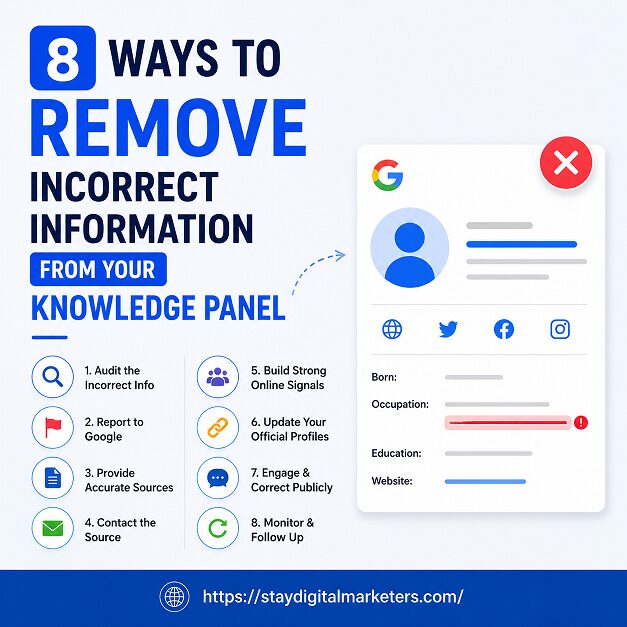
A Google Knowledge Panel can display outdated job titles, wrong birthdates, merged identities, or facts pulled from unreliable sources, and it can feel impossible to fix. The short answer: you cannot edit a Knowledge Panel directly, but you can submit corrections through Google’s Feedback tool, fix the underlying sources it pulls from, or request removal in cases involving policy violations, and Google reviews each request individually.
This guide breaks down every practical method for correcting a Knowledge Panel, in the order most people should try them, based on how Google’s entity systems actually work.
Key Takeaways
A Knowledge Panel is an information box that appears on the right side of Google Search results when someone searches for a recognized entity: a person, business, organization, or place. It is generated automatically by Google’s Knowledge Graph, a database that connects facts about entities pulled from sources across the web, including Wikipedia, Wikidata, official websites, and structured data markup.
Because the panel is auto-generated rather than manually written, errors creep in for predictable reasons. Two people with similar names get merged into one entity. An old job title never gets updated because the source article that mentioned it never gets corrected. A photo gets attached to the wrong profile because of a metadata mismatch. Understanding that the panel reflects what Google’s systems currently believe, not what you type into a form, is the foundation for fixing it.
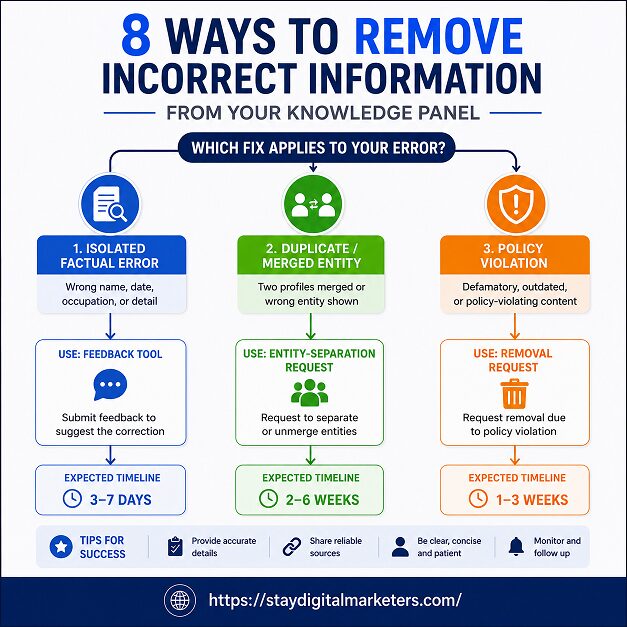
The fastest entry point for most people is the public Feedback link. Locate your Knowledge Panel in search results, then look for a small pencil icon or “Feedback” link, usually at the bottom right corner of the panel. Clicking it opens a form where you select the specific field that’s wrong, describe the correction, and submit supporting evidence.
This method works for anyone, whether or not you’re verified as the subject of the panel. It’s the right first move when you spot an isolated factual error, such as a wrong founding year or an incorrect job title, and you don’t yet have a claimed panel. The tradeoff is priority: unverified feedback sits in a general review queue and typically takes longer to process than requests from a verified owner.
Using the right Google Review Management Software helps businesses monitor customer feedback, respond promptly, and build a stronger online reputation across multiple locations.
Suggesting an edit through the public Feedback link is open to anyone. Claiming the panel is a separate, stronger track available only to the subject of the panel or an authorized representative. Once claimed and verified, you get access to a “Suggest edits” option that Google prioritizes above anonymous feedback.
To claim a panel, open it, select the menu option for claiming, and sign in using an account tied to an official website or verified profile associated with the entity. Google checks whether it can associate that account with the entity automatically. If it can, you gain the prioritized editing track. If someone else already claimed the panel, you’ll need to go through Google’s account recovery process, which involves Google contacting the current claimant and waiting a set period for a response before the panel becomes available again.
Claiming is worth doing before you invest time in repeated correction attempts, because verified requests move through review faster and carry more weight than the anonymous alternative.
KP-VERIFY Framework: Four Checks Before You Submit Any Correction
Original framework for evaluating a Knowledge Panel error before submitting a fix:
Not every part of a panel accepts a direct correction. Some fields respond to Feedback submissions with evidence. Others are derived entirely from external sources and can only be changed by fixing those sources. A smaller set is locked unless the content violates Google’s policies.
| Field | Editable Through Feedback? | What Actually Works |
|---|---|---|
| Social profile links | Yes | Suggest new or corrected links directly |
| Featured image | Suggest only | Provide a clear, publicly accessible image URL; stronger results often come from fixing Wikipedia/Wikimedia sourcing |
| Title or role | Rarely | Requires strong independent evidence the current title is wrong |
| Subtitle | Locked | Not customizable; Google generates it automatically |
| Description | Locked (source-derived) | Fix the underlying Wikipedia or Wikidata entry |
| “People also search for” | Locked | Removable only for policy violations, not preference |
| Birthdate, founding date | Source-derived | Correct at Wikidata or an authoritative primary source |
Knowing which category a field falls into before submitting a request saves time and avoids repeated rejections for the same locked field.
When a Knowledge Panel field is locked or clearly source-derived, the durable fix is correcting the data Google is actually pulling from, not the panel itself. Wikipedia and Wikidata are two of the most influential sources feeding the Knowledge Graph, so an inaccurate or poorly cited Wikipedia article often explains a stubborn panel error better than anything else.
The process involves editing the Wikipedia article with proper citations to reliable, independent sources, or correcting the structured data fields on the entity’s Wikidata item. Once the source is accurate and well-supported, Google’s systems need time to re-crawl and re-ingest the update before the panel reflects the change. This is not instant. Propagation can take weeks, and there’s no guarantee the panel updates automatically even after the source is fixed, since Google’s systems still weigh multiple signals before trusting a new fact.
For businesses and public figures without an existing Wikipedia page, this is often the point where structured data on an official website, paired with schema.org markup, becomes the next best lever, since Google also draws from consistent, well-marked-up information across the open web.
Duplicate entities are a distinct problem from factual errors, and they need to be flagged differently. This happens when Google’s systems mistakenly combine two separate people or businesses with similar names into a single panel, mixing photos, bios, or career details that belong to different entities entirely.
The fix starts with the Feedback tool, where you specifically describe the merge rather than trying to correct individual facts one at a time. Since the panel is treating two entities as one, correcting a single field won’t resolve the underlying confusion. It helps to include links to both entities’ distinct, verifiable online presences (separate official sites, separate verified social profiles) so Google’s systems have a clearer signal to separate them. This category of error often takes longer to resolve than a simple fact correction, because it requires Google’s Knowledge Graph to re-evaluate entity relationships, not just update a field.
Some information isn’t just factually wrong, it violates Google’s content policies, such as doxxing content, non-consensual explicit imagery, or content that falls under specific legal removal categories. For these cases, Google provides dedicated removal request tools separate from the general Feedback flow, and panels can sometimes be adjusted or suppressed based on documented policy violations rather than a standard factual correction.
This path is narrower than general correction requests. It applies to specific categories, like personal contact information appearing without consent, or content Google has determined qualifies for removal under its published policies, rather than general reputation concerns or disagreements over subjective phrasing.
Rejections are common, and the most frequent cause is weak or non-corroborating evidence. Google reviews each suggested edit individually, and a request without an independent, authoritative source backing it up is easy to dismiss. Before resubmitting, strengthen your evidence rather than repeating the same request. Add a second independent source. If you’re pointing to your own website, pair it with third-party confirmation, since self-published claims carry less weight for verification purposes.
It’s also worth checking whether you’re logged into the correct account. A frequent, avoidable reason “Suggest edits” doesn’t appear, or a submitted edit stalls, is being signed into a different Google account than the one used to claim the panel.
For a single, clear-cut factual error, most people can resolve it themselves through Feedback or a straightforward Wikipedia correction. Professional help becomes worth considering when the issue is more structural: a duplicate entity that keeps re-merging, a description drawn from a poorly sourced Wikipedia article that keeps getting reverted, or a panel disappearing and reappearing with inconsistent information across multiple corrections.
Agencies working in this space typically combine source-side fixes (Wikipedia editing, schema markup, structured citations) with ongoing monitoring, since a single correction rarely holds if the underlying web presence remains inconsistent. The value isn’t a faster Feedback form submission, since anyone can use that for free, but persistence across the weeks or months a full correction often requires.
Can I edit my Google Knowledge Panel directly?
No. You submit suggested corrections through Feedback or a verified “Suggest edits” flow, and Google’s systems decide whether to accept them.
How long does it take Google to fix a Knowledge Panel error?
Google states reviews generally take days to weeks, though source-based fixes involving Wikipedia or Wikidata add additional propagation time before the panel updates.
Why doesn’t my Knowledge Panel have a “Suggest edits” option?
This usually means the panel isn’t claimed yet, you’re signed into the wrong account, or the panel isn’t eligible for claiming at all.
Can a Knowledge Panel be deleted entirely?
Only in narrow cases involving policy violations. Panels generally can’t be removed simply because the subject prefers not to have one.
Does fixing Wikipedia guarantee my Knowledge Panel will update?
No. It significantly improves the odds over time since Wikipedia is a major data source, but propagation isn’t instant or guaranteed.
What’s the most common reason correction requests get rejected?
Weak or missing independent evidence. A correction without a credible third-party source to back it up is easy for reviewers to dismiss.
Should I submit multiple corrections at once?
No. Submitting one specific, well-evidenced fact at a time gets reviewed more efficiently than bundling several unrelated changes into one request.
Businesses working through Knowledge Panel corrections alongside broader entity-building efforts often pair this work with structured backlink and citation strategies, since consistent, authoritative signals across the web strengthen how Google’s systems trust an entity over time. Stay Digital Marketers works with brands on exactly this kind of foundational entity work, including guest posting, press release distribution, SaaS backlinks, niche edits, Wikipedia page creation, and Google Knowledge Panel support, treating panel accuracy as part of a wider, ongoing digital presence rather than a one-time fix.

Filza Taj is an MPhil in Human Resources-turned SEO Specialist, Content Strategist, and Digital Marketing Consultant with over 5 years of experience helping businesses in 30+ countries grow online. As the Founder of Stay Digital Marketers (staydigitalmarketers.com), she delivers results-driven solutions in link building, guest posting, PR distribution, niche edits, multilingual backlinks, and content marketing. She publishes daily SEO insights and actionable strategies to help brands strengthen their online presence, attract the right audience, and convert clicks into loyal customers.
Filza@staydigitalmarketers.com
Stay Digital Marketers
Need SEO, Link Building or Digital Marketing Services?
Request a Free Audit →