
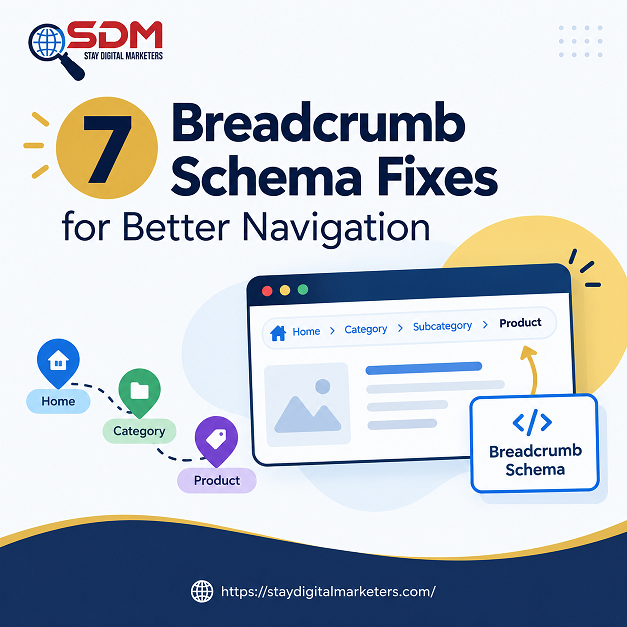
Breadcrumb schema, formally BreadcrumbList structured data, describes the hierarchical path from a site’s homepage down to the current page, letting Google replace a raw URL in search results with a readable trail like “Home > Electronics > Smartphones.” Unlike two other structured data types covered elsewhere in current SEO guidance, FAQPage and HowTo, both fully deprecated as rich results, breadcrumb rich results remain active and, according to at least one 2026 structured data audit, are one of the few rich result types still growing in usage. Reports suggesting Google removed breadcrumbs from desktop or mobile in 2026 are inaccurate; the feature is unchanged, which makes fixing an existing implementation a genuinely worthwhile use of time rather than maintenance on a feature quietly headed for retirement.
Despite that stability, breadcrumb schema is implemented incorrectly astonishingly often. One 2026 audit of live structured data found BreadcrumbList markup broken on close to 40 percent of sites checked, most frequently due to a mismatch between what a visitor actually sees on the page and what the schema declares. The seven fixes below address the specific, recurring error patterns behind that figure, not a from-scratch implementation guide, since most sites already have breadcrumb schema in place and need it repaired rather than rebuilt. Each fix maps to a symptom a team is likely already seeing in Search Console, rather than a theoretical best practice with no observable failure mode attached.
Key Takeaways
Nearly every recurring breadcrumb schema error traces back to one root cause: the visible HTML breadcrumb and the JSON-LD schema being generated by two separate systems that can quietly drift out of sync. The fix underlying most of the seven below is the same in every case: generate both the visible trail and the schema from the same taxonomy or CMS hierarchy data at the same time, rather than maintaining them as two independently edited outputs that someone has to remember to keep aligned by hand.
A page built this way cannot develop a mismatch, since there is only one source of truth feeding both the HTML a visitor sees and the JSON-LD a crawler parses. Retrofitting this rule onto an existing site usually resolves several of the individual fixes below simultaneously, rather than requiring each to be patched separately, which makes it the highest-leverage single change a team can make when facing a long list of breadcrumb errors in an audit.
The most common error by a wide margin: a visible trail reading “Home > Blog > SEO” paired with schema declaring “Home > Articles > SEO Tips.” Google cross-validates structured data against visible content, and this exact mismatch is what the Single Source of Truth Rule above is built to prevent. Fixing it means auditing every page template, not just a sample, since the drift usually traces to one specific template rather than the whole site, often introduced during an unrelated design update months earlier.
Every breadcrumb item except the current page requires a URL, and that URL must match the page’s canonical tag exactly, no trailing-slash variants, no www versus non-www inconsistency, no http versus https mismatch. A URL that technically resolves but differs from the canonical weakens the schema’s value even when it does not trigger an outright error, and this is one of the more overlooked fixes precisely because nothing appears broken on the surface.
Position values must start at 1 and increase sequentially with no gaps or repeats. A template bug that skips a number or starts at 0 can cause Google to reject the entire breadcrumb markup rather than partially accepting it, so this is a case where a small numbering error produces a total loss of the rich result, not a partial one, which makes it worth checking first when a page fails validation entirely.
A product belonging to several categories should not generate a different breadcrumb trail depending on how a visitor arrived at the page. Select one canonical, evergreen path, typically the product’s primary category, and use it consistently in both the schema and the visible trail regardless of entry point, rather than dynamically reflecting the user’s navigation history, which is what causes two visitors to see two different trails for the identical page.
Filter selections, color, size, price range, should never appear as breadcrumb levels. Treating filter parameters as hierarchy steps can generate thousands of near-duplicate breadcrumb variants across an ecommerce catalog, confusing both the indexed URL set and the hierarchy signal breadcrumbs are meant to provide. Keep faceted URLs out of the breadcrumb trail entirely, reflecting only the stable category structure underneath the filters.
When pages move during a redesign or CMS migration, breadcrumb trails built from the old hierarchy often survive the move unnoticed, pointing to categories or parent pages that no longer exist. Reviewing site migrations across a range of client projects shows this specific failure surfacing weeks after launch, once search engines have recrawled enough of the site to expose the mismatch in Search Console, well after the team assumed the migration was complete. Treating breadcrumb regeneration as a required line item in any migration checklist, alongside redirects and canonical updates, catches this before it surfaces on its own weeks later.
Breadcrumb schema injected entirely through client-side JavaScript can appear correctly in a browser’s live DOM while remaining invisible in the actual HTML Google’s renderer processes. Server-side rendering, or at minimum a pre-rendered fallback for crawlers, is the more reliable approach than trusting client-side rendering alone to deliver schema consistently across every crawl.
Run Google’s Rich Results Test to confirm eligibility, then check Search Console’s Enhancements report for the BreadcrumbList section to monitor errors and warnings at scale across the site rather than one page at a time. Passing the Rich Results Test on a single page does not confirm the fix scaled correctly across every template, so a site-wide check in Search Console remains necessary after any template-level change, particularly on large sites where a single shared template drives thousands of pages at once.
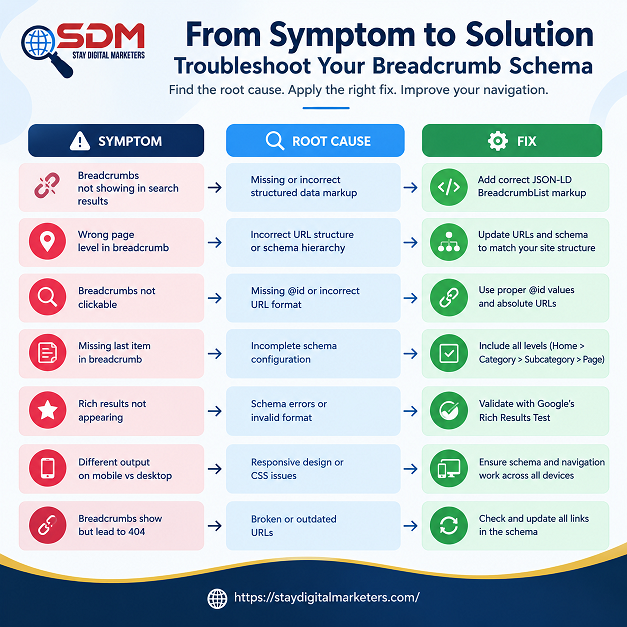
| Fix | Symptom | Root Cause |
| Mismatched visible vs schema trail | Rich Results Test passes, page still flagged | Two systems generating breadcrumbs independently |
| Missing or non-canonical URLs | Warnings in Search Console Enhancements report | URLs hand-typed instead of pulled from canonical tags |
| Incorrect position numbering | Breadcrumb markup rejected entirely | Manual editing or a faulty CMS template |
| Conflicting multi-category paths | Different trails for the same product on different visits | No defined canonical path in the taxonomy |
| Faceted URLs in the trail | Thousands of near-duplicate breadcrumb variants indexed | Filter parameters treated as hierarchy levels |
| Stale post-restructure breadcrumbs | Trails pointing to pages that no longer exist | Site move completed without updating the breadcrumb source |
| Unparsed JavaScript-rendered trails | Schema present in browser but absent in Google’s rendered HTML | Client-side-only rendering with no server-side fallback |
No. Unlike FAQPage and HowTo, breadcrumb rich results were not deprecated in 2026 and remain fully active on desktop. Reports claiming otherwise are inaccurate; BreadcrumbList is one of the few rich result types that has continued growing in usage.
Very common. One 2026 structured data audit found BreadcrumbList markup was implemented incorrectly on close to 40 percent of sites checked, most often due to mismatches between the visible breadcrumb trail and the underlying schema.
A mismatch between what a visitor sees on the page and what the JSON-LD schema declares. Google cross-checks the two, and a visible trail reading “Home > Tools > Converter” next to schema claiming a different path is one of the most frequently flagged errors in structured data audits.
No. Filter combinations, such as color or size selections on an ecommerce category page, should not appear as breadcrumb levels. Including them creates near-duplicate trails across thousands of URL variants, which confuses both users and search engines about the actual site hierarchy.
Pick one canonical path and use it consistently in both the visible trail and the schema, rather than generating a different path depending on how a visitor arrived at the page. The chosen path should reflect the product’s primary, evergreen category.
It can, but only if Google’s renderer actually sees the schema in the rendered HTML, not just in the browser’s live DOM. Server-side rendering or a pre-rendered fallback is safer than relying entirely on client-side JavaScript to inject breadcrumb markup.
Clean breadcrumb schema clarifies site structure for search engines and AI systems alike, but structural clarity works best alongside genuine authority signals built elsewhere. Stay Digital Marketers works on that broader layer, including guest posting, press release distribution, SaaS backlinks, niche edits, multilingual backlinks, Wikipedia page creation, and Google Knowledge Panel creation, alongside complete SEO services, so a well-structured site also carries the off-page signals that give its clear hierarchy somewhere to matter.

Filza Taj is an MPhil in Human Resources-turned SEO Specialist, Content Strategist, and Digital Marketing Consultant with over 5 years of experience helping businesses in 30+ countries grow online. As the Founder of Stay Digital Marketers (staydigitalmarketers.com), she delivers results-driven solutions in link building, guest posting, PR distribution, niche edits, multilingual backlinks, and content marketing. She publishes daily SEO insights and actionable strategies to help brands strengthen their online presence, attract the right audience, and convert clicks into loyal customers.
Filza@staydigitalmarketers.com
Stay Digital Marketers
Need SEO, Link Building or Digital Marketing Services?
Request a Free Audit →