
A practitioner’s guide to reading pricing pages the way vendors actually build them
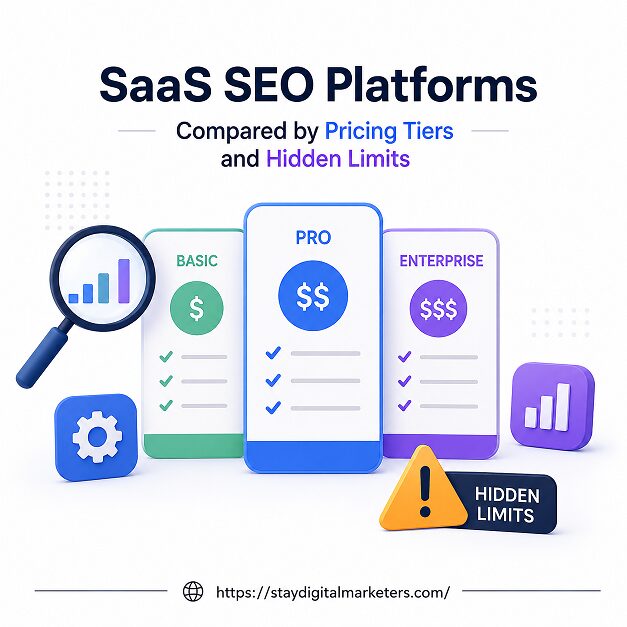
A SaaS SEO platform is a subscription tool such as Ahrefs, Semrush, SE Ranking, or a niche content-optimization suite that gives marketers keyword data, rank tracking, technical audits, or content scoring through a hosted dashboard rather than in-house infrastructure. Pricing on these platforms is built in tiers, typically a free or starter plan, a growth or professional plan, and an enterprise plan, with the sticker price representing only part of what a buyer ends up spending.
The gap between the advertised monthly rate and the real monthly cost comes from what sits underneath each tier: keyword caps, crawl limits, seat restrictions, API throttling, and data refresh delays that rarely appear next to the price. Understanding how these tiers are structured, and where the limits are buried, is what separates a buyer who picks the right plan the first time from one who upgrades three months in after hitting a wall they never saw coming.
Key Takeaways
A SaaS SEO platform bundles keyword research, rank tracking, backlink analysis, site auditing, or content optimization into one hosted product, billed monthly or annually. Pricing almost always follows one of five models: flat-rate subscription, credit or usage-based billing, per-seat billing, tiered flat-rate with volume caps, or a hybrid of these. The tiered flat-rate model dominates the category, which is why most comparison pages show three or four boxes with a checkmark list underneath.
Annual billing on nearly every platform in this space shaves 15 to 25 percent off the monthly rate. That discount is real, but it also locks a team into a plan before they know whether the data caps and seat limits will actually fit their workflow, which is the first hidden cost most buyers overlook.
Most SaaS SEO platforms sort into four rough tiers, and knowing what each one is actually built for prevents both overspending and getting stuck on a plan that cannot keep up.
Free and starter plans, typically zero to roughly 100 dollars a month, exist to let a solo user or very small site test the interface. Keyword tracking is usually capped in the low hundreds, crawl limits sit under a few thousand pages, and export or API access is either absent or heavily restricted. These tiers are genuinely useful for learning a platform, not for running an active content or link building program.
Growth and professional tiers, generally 150 to 300 dollars a month, add multiple projects, competitor tracking, and collaboration seats. This is where most growing teams land, and it is also where the first real friction shows up: keyword tracking quotas that looked generous at the free tier now feel tight once a team is monitoring dozens of pages and several competitors at once.
Enterprise tiers, often 500 to 600 dollars a month and up, or fully custom, add single sign-on, dedicated account management, higher API ceilings, and white-label reporting. The catch is that enterprise pricing is rarely published, which means the buyer has no way to comparison shop without booking a sales call, and the final number often depends more on negotiating leverage than on a fixed rate card.
The advertised price is the visible part of the iceberg. The limits that actually shape day-to-day usage sit one click deeper, usually in a terms-of-service page or a support article the buyer only reads after hitting the wall.
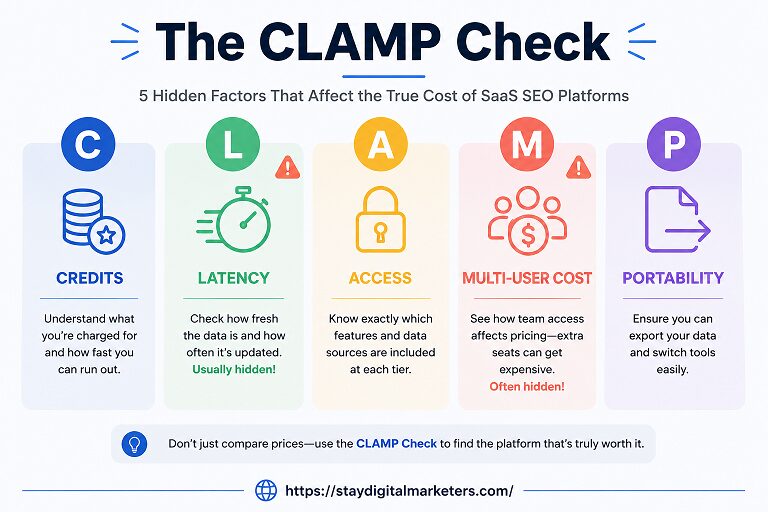
Reading a pricing page in isolation rarely surfaces these limits. The CLAMP framework gives buyers five checkpoints to run through on any SaaS SEO platform before entering a card number.
Credits: Confirm whether keywords, reports, or crawls are billed as a hard cap, a soft cap with overage fees, or true unlimited usage, since these three behave very differently once volume climbs.
Latency: Check how often rank and backlink data actually refreshes on the tier being considered, not the top tier shown in the marketing screenshots.
Access: Verify API availability and rate limits at the intended tier, since this determines whether the platform can plug into an existing dashboard or CRM.
Multi-user cost: Calculate the real monthly price once every teammate who needs a login is added, not just the single-seat number on the pricing page.
Portability: Confirm whether historical data, reports, and white-label exports travel with the account or reset if a plan is downgraded.
Running a shortlist of platforms through CLAMP before committing turns a marketing comparison into an operational one, and it is usually the exercise that reveals why two plans priced 40 dollars apart can end up costing very different amounts by month six.
The table below groups typical pricing bands by category rather than naming a single winner, since the right platform depends on which limits matter most for a given team.
| Tier | Typical Price | What You Get | Common Hidden Limit |
| Free / Starter | $0 to $99/mo | 1 project, basic keyword tracking, limited crawl | Low keyword cap, weekly data refresh, no API |
| Growth / Pro | $150 to $300/mo | Multiple projects, competitor tracking, few seats | Seat add-ons, overage fees past quota |
| Business | $300 to $600/mo | Higher quotas, white-label options, more seats | White-label often gated to top sub-tier |
| Enterprise | $600+/mo or custom | SSO, dedicated support, high API ceiling | Pricing not published, requires sales call |
Two platforms priced 20 dollars apart can end up costing wildly different amounts once real usage kicks in. A tool with a hard credit cap and a steep overage fee can quietly double its effective monthly cost for a high-output team, while a slightly pricier flat-rate plan with generous quotas stays predictable all year. Pricing structure, not the headline number, is what determines whether a plan still fits in month six.
Teams running content programs at volume also tend to stack multiple tools, one for keyword research, one for content scoring, one for rank tracking, because few single platforms cover all three well at the lower tiers. That stacking is exactly where hidden limits compound: a keyword cap on one tool and a seat limit on another can push the real monthly spend well past what either pricing page implied on its own.
An enterprise tier is worth the jump when a team consistently hits quota walls on the mid tier, needs API access for internal dashboards, or requires white-label reporting for clients. It is rarely worth it for a single in-house marketer managing one or two sites, since most of what enterprise adds, SSO, dedicated account management, custom contracts, solves problems that only show up at agency or multi-brand scale.
The better test is usage history rather than feature envy. If the last three months show repeated overage charges or a team working around a seat cap by sharing logins, the enterprise tier is likely cheaper than the current workaround. If those pressures are not present, the mid tier is almost always the more efficient spend.
Overage fees can usually be avoided with three habits: check the platform’s usage dashboard weekly rather than at renewal time, set internal alerts at 80 percent of any keyword or credit quota, and read the fair-use language in the terms of service before assuming a plan labeled unlimited has no ceiling at all. Many unlimited claims carry a fair-use cap that only appears once support is contacted about unusually high usage.
It also helps to separate testing from production. Running experimental keyword research on a free tier and reserving the paid quota for confirmed priority terms keeps a team well under quota limits without sacrificing coverage on the work that actually ships.
Start by mapping actual monthly usage, keywords tracked, pages crawled, seats needed, before opening a single pricing page. Run the shortlist through the CLAMP framework, price out the real cost with every teammate added, and confirm data refresh frequency at the tier being considered rather than the tier shown in the demo. A plan that looks 30 percent more expensive on paper is often cheaper once overage fees, seat add-ons, and workaround time are counted.
For teams evaluating multiple platforms at once, it helps to request a trial at the specific tier under consideration, not the top tier a sales team defaults to, since limits and refresh rates can differ meaningfully between adjacent plans on the same product.
Most businesses land between 150 and 300 dollars a month for a growth-tier plan, with solo users starting around 65 to 99 dollars and agencies or enterprise teams paying 600 dollars a month or more.
Many do. Exceeding a keyword, crawl, or report quota typically triggers either a per-unit overage fee or a temporary lock until the next billing cycle, depending on the platform’s policy.
Annual billing typically saves 15 to 25 percent compared to paying monthly, but it is best used once a team has confirmed the tier fits real usage, since switching plans mid-contract is rarely straightforward.
Agencies typically need white-label reporting, multiple client projects, and higher seat counts, all of which are usually gated to business or enterprise tiers rather than included on growth plans.
Free tiers work for learning a tool or managing a single small site, but the low keyword caps and slow data refresh rates usually become limiting once a business starts actively competing for rankings.
Per-seat fees and credit overages are the two most common hidden costs, since both scale with team size or output in ways the base subscription price does not reflect.
A quarterly review against actual usage, keywords tracked, seats active, overage charges incurred, is enough to catch a mismatched tier before it becomes an expensive habit.
The sticker price on a SaaS SEO platform is a starting point, not a budget. Running any shortlist through the CLAMP framework, credits, latency, access, multi-user cost, and portability, before signing up is the difference between a tier that holds up for a year and one that forces an unplanned upgrade three months in. Agencies and in-house teams that need help translating a content and link building budget into results without falling into the hidden-limit trap often work with specialists like Stay Digital Marketers, whose services span guest posting, niche edits, press release distribution, SaaS backlinks, Wikipedia page creation, and Google Knowledge Panel management, giving brands a way to scale visibility without managing every tool tier decision in-house.

Filza Taj is an MPhil in Human Resources-turned SEO Specialist, Content Strategist, and Digital Marketing Consultant with over 5 years of experience helping businesses in 30+ countries grow online. As the Founder of Stay Digital Marketers (staydigitalmarketers.com), she delivers results-driven solutions in link building, guest posting, PR distribution, niche edits, multilingual backlinks, and content marketing. She publishes daily SEO insights and actionable strategies to help brands strengthen their online presence, attract the right audience, and convert clicks into loyal customers.
Filza@staydigitalmarketers.com
Stay Digital Marketers
Need SEO, Link Building or Digital Marketing Services?
Request a Free Audit →