
Tool features and prices below reflect what each vendor and independent review published as of late September 2026, the most current data available at the time of writing. Schema tooling changes quickly, so confirm pricing on each vendor’s page before buying.
A schema markup generator is a tool that produces structured data, usually JSON-LD, describing what a page is about, such as an article, a product, or a local business, without requiring the user to write the code by hand. Generators fall into three groups. Free web generators such as Merkle’s tool output a single block of JSON-LD to paste into one page. WordPress plugins such as Rank Math, Yoast SEO, and All in One SEO generate schema inside the editor and apply it across a whole site. Enterprise platforms such as Schema App manage structured data as a connected knowledge graph across many templates.
The short answer is that free web generators suit a handful of pages, plugins suit WordPress sites of any size, and platforms suit large sites with governance needs. The seven tools below cover all three groups, so a reader can match the tool to the size and stack of the site rather than picking the most popular name.
Key Takeaways
Roundups on this query tend to split into two camps. One camp lists WordPress plugins and enterprise platforms and prints “contact vendor” beside most prices, which leaves a reader searching for a generator without a single free tool to try. The other camp lists free generators using type counts that are already out of date. The jsonld generator went from three schema types to 17, with live validation and more than 100 LocalBusiness sub-types, in an April 2026 rebuild, according to Jason Burns’ 2026 comparison, so any comparison written before that rebuild understates it.
Several roundups also skip a problem hiding in every generator’s type menu. FAQPage and HowTo remain selectable, but Google ended FAQ rich results on May 7, 2026 and HowTo rich results in 2023, so markup generated for either earns no visual result in Google Search. Choosing a generator by how many types it lists, rather than by which types still pay off, is the mistake this guide is built to avoid.
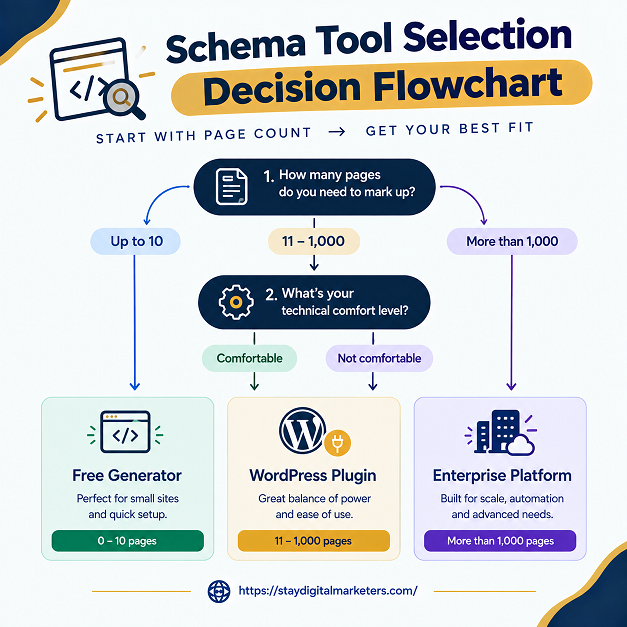
Form-based generators share one structural limit: the JSON-LD they produce is a snapshot of one page at one moment. Once pasted in, it never updates itself. Three questions decide whether a snapshot is safe or whether the site needs automation instead.
Failing any of the three points toward a plugin or platform that regenerates markup from the page’s own data. Reviewing structured data across client audits shows the same pattern repeatedly: generated JSON-LD pasted once and never revisited tends to drift out of sync after a redesign or price change, and the mismatch often goes unnoticed until validation errors appear.
Hosted on the TechnicalSEO site and built by Max Prin, now owned by Dentsu’s Merkle, this is the most widely cited free generator. It needs no account and shows live JSON-LD output as fields are filled in. Coverage extends beyond the common types to Recipe, JobPosting, VideoObject, and Event, according to AY Rank’s 2026 comparison. The tradeoff is the snapshot limit above: every page is generated by hand, so it fits small sites and one-off pages, not catalogs.
The April 2026 rebuild made this the deepest free option outside the usual Merkle and RankRanger pair, with 17 schema types, more than 100 LocalBusiness sub-types, live validation, and form state that persists between sessions. It suits developers and local SEOs marking up specific business categories, such as a chain of dental offices or restaurants. Because the rebuild is recent, spot-check its output against a validator before relying on it for production pages.
Now part of Similarweb, this free tool is built around one goal: making a page eligible for Google rich results. It builds Google’s required fields into the form and links out to validation, which reduces the incomplete-markup errors that hand-written JSON-LD often produces. Its type list is narrower than Merkle’s or jsonld’s, so it works best for the common cases rather than unusual schema types.
For WordPress, Rank Math offers the most capable built-in schema tooling: a free tier covering 20-plus types, a visual custom-schema builder for any type Schema.org supports, and on paid plans, reusable Schema Templates that apply markup automatically by content condition. Those 20-plus types are a small slice of the 823 types Schema.org lists as of June 2026, which is why the custom builder matters. Paid plans are reported from $7.99 per month billed annually. It only works on WordPress.
Yoast takes a connected-graph approach, linking Article, Organization, and Person markup into one related structure with little manual configuration. That suits teams already using Yoast for titles and sitemaps who want schema handled in the same place. Yoast SEO Premium is reported at $118.80 per year. It offers fewer custom schema controls than Rank Math, so sites needing unusual types may outgrow it.
AIOSEO includes a schema generator inside its WordPress plugin and is often recommended as the friendlier alternative when Rank Math feels dense. It fits sites already using AIOSEO for meta tags and sitemaps, where adding schema in the same tool reduces complexity. Run only one schema-producing plugin per site: two plugins emitting JSON-LD produce duplicate Article blocks and conflicting markup.
Schema App treats structured data as a governed, connected graph rather than one-off code blocks, and it is the only tool in one 2026 comparison with documented API access and a monitoring dashboard, which suits agencies managing many sites. Pricing is quote-based. It is overkill for a small site, and setup is a project rather than a checkbox, but past a few dozen templated pages its rule-based approach is what keeps markup from drifting.
Types that still produce rich results in Google Search include Product, Review and AggregateRating, Article, Recipe, Video, Organization, LocalBusiness, and BreadcrumbList. FAQPage and HowTo no longer do, and Google also deprecated several niche types in January 2026, including Practice Problems and Nutrition Facts. Generating those types is not harmful, since they remain valid Schema.org markup, but they should not be prioritized as a ranking or click-through lever.
The same discipline applies to AI search. Google Search Central states that no special structured data is required to appear in AI Overviews or AI Mode, and an Ahrefs controlled test of 1,885 pages found no meaningful citation lift from adding schema alone. A generator produces valid markup. Whether a page earns citations still depends on the content behind it.
| Tool | Type | Cost | Best For |
| Merkle Schema Markup Generator | Free web generator | Free, no signup | One-off pages needing broad type coverage |
| jsonld JSON-LD Generator | Free web generator | Free | Deep LocalBusiness sub-types and 17 schema types |
| RankRanger Schema Generator | Free web generator | Free, no signup | Rich-result-focused markup with required fields built in |
| Rank Math | WordPress plugin | Free tier; paid from $7.99/mo billed annually (reported) | Flexible, rule-based schema across a WordPress site |
| Yoast SEO | WordPress plugin | Free; Premium $118.80/yr (reported) | Connected schema graph with little configuration |
| All in One SEO | WordPress plugin | Free and paid tiers | Beginners who find Rank Math too dense |
| Schema App | Enterprise platform | Quote-based | Many templates, governance, and API access |
Run every generated block through two validators. Google’s Rich Results Test confirms eligibility for the rich result types Google still supports, and the Schema.org Validator checks the markup against the full specification. Then confirm the values in the JSON-LD match what a visitor sees on the page, since valid syntax with stale or template-placeholder values, an empty product SKU, for instance, still produces weak structured data.
Merkle’s generator on the TechnicalSEO site is the most widely cited free option, with no signup and live JSON-LD output for types like Article, Product, LocalBusiness, Recipe, and Event. The jsonld generator now covers 17 types, and RankRanger’s tool builds in Google’s required fields.
Often no. Rank Math, Yoast SEO, and All in One SEO all generate schema inside the editor and keep it aligned as content changes. A standalone generator still helps for one-off pages or custom types your plugin does not cover.
No. Google Search Central says no special structured data is required for AI Overviews or AI Mode, and an Ahrefs controlled test found no meaningful citation lift from adding schema alone. Generators produce valid markup, not guaranteed AI visibility, so page content still decides whether a page earns citations.
Only for genuine, visible content. Google ended FAQ rich results on May 7, 2026 and HowTo rich results in 2023, so generated markup earns no visual result. The types remain valid Schema.org markup that AI systems can still parse, but they should describe questions and steps visible on the page.
Commonly cited guidance puts the practical limit around 50 pages. Beyond that, hand-generated JSON-LD becomes a snapshot that drifts as page content changes, and a plugin or platform that regenerates markup automatically from page data is the safer, lower-maintenance choice.
Rank Math’s free tier covers 20-plus schema types, with paid plans reported from $7.99 per month billed annually. Yoast SEO Premium is reported at $118.80 per year. Prices change often, so confirm current figures and plan limits on each vendor’s own pricing page before buying.
Correct schema helps search engines and AI systems read a page accurately, but reading a page accurately is different from trusting it. Stay Digital Marketers works on the trust side of that equation, including guest posting, press release distribution, SaaS backlinks, niche edits, multilingual backlinks, Wikipedia page creation, and Google Knowledge Panel creation, alongside complete SEO services, so well-formed markup sits on a domain with the outside authority to make it count.

Filza Taj is an MPhil in Human Resources-turned SEO Specialist, Content Strategist, and Digital Marketing Consultant with over 5 years of experience helping businesses in 30+ countries grow online. As the Founder of Stay Digital Marketers (staydigitalmarketers.com), she delivers results-driven solutions in link building, guest posting, PR distribution, niche edits, multilingual backlinks, and content marketing. She publishes daily SEO insights and actionable strategies to help brands strengthen their online presence, attract the right audience, and convert clicks into loyal customers.
Filza@staydigitalmarketers.com
Stay Digital Marketers
Need SEO, Link Building or Digital Marketing Services?
Request a Free Audit →